πŸ€–
β†’
πŸ”§
πŸ“§
πŸ”
πŸ’Ύ

What is Tool-Calling in LLMs

Canonical Definitionsβœ“ citation-safe-referenceπŸ“– 45 minutesUpdated: 2026-01-05

Executive Summary

Tool-calling is a capability that enables Large Language Models to generate structured requests to invoke external functions, APIs, or services, extending their abilities beyond text generation to take real-world actions.

1

Tool-calling transforms LLMs from passive text generators into active agents capable of retrieving real-time data, executing computations, and interacting with external systems through well-defined function interfaces.

2

The mechanism works by training models to recognize when a tool is needed, select the appropriate tool from available options, generate properly formatted arguments, and interpret the results to continue the conversation or task.

3

Production tool-calling systems require careful attention to security boundaries, error handling, latency management, and cost optimization, as each tool invocation introduces external dependencies and potential failure points.

The Bottom Line

Tool-calling is the foundational capability that enables LLMs to move from answering questions to completing tasks, making it essential for building AI agents and automated workflows. Organizations implementing tool-calling must balance the power of external integrations against the complexity of managing security, reliability, and costs at scale.

Definition

Tool-calling (also known as function calling) is a mechanism by which Large Language Models generate structured output that specifies which external function to invoke and what arguments to pass, enabling the model to interact with APIs, databases, and other external systems.

Rather than producing only natural language responses, tool-calling LLMs output JSON-formatted function calls that an orchestration layer executes, returning results that the model incorporates into its subsequent reasoning and responses.

Extended Definition

Tool-calling represents a fundamental architectural shift in how LLMs interact with the world, moving from a purely generative paradigm to an agentic one where models can take actions with real consequences. The capability is implemented through specialized training that teaches models to recognize situations requiring external tools, select from a provided toolkit, generate syntactically correct function calls with appropriate arguments, and seamlessly integrate returned results into coherent responses. Modern implementations support parallel tool calling (invoking multiple functions simultaneously), nested tool calls (where one tool's output feeds another), and sophisticated error recovery when tools fail or return unexpected results. The tool-calling interface has become a de facto standard across major LLM providers, though implementation details vary in how tools are defined, how calls are formatted, and how results are processed.

Etymology & Origins

The term 'tool-calling' emerged from the AI agent research community, drawing on the cognitive science concept of tool use as a marker of intelligence. OpenAI popularized 'function calling' with their June 2023 GPT API release, while Anthropic adopted 'tool use' terminology. The terms are now used interchangeably in industry, though 'tool-calling' has become the more general term encompassing any external capability invocation, while 'function calling' sometimes implies a more programmatic, code-like interface.

Also Known As

Function callingTool useExternal function invocationAPI callingAction executionPlugin invocationCapability invocationTool invocation

Not To Be Confused With

Retrieval-Augmented Generation (RAG)

RAG retrieves static documents to augment context, while tool-calling executes dynamic functions that can perform computations, modify state, or fetch real-time data. RAG is read-only context injection; tool-calling enables read-write operations with external systems.

Structured Output

Structured output refers to constraining LLM responses to follow a specific schema (like JSON), while tool-calling specifically generates function invocation requests. All tool calls are structured output, but not all structured output is tool-calling.

Prompt Injection

Prompt injection is a security attack where malicious input manipulates LLM behavior, while tool-calling is a legitimate capability. However, tool-calling systems must be hardened against prompt injection attacks that could trigger unauthorized tool invocations.

Code Execution

Code execution environments (like Code Interpreter) run arbitrary code generated by the LLM, while tool-calling invokes predefined functions with constrained interfaces. Tool-calling is more restrictive and controllable than open-ended code execution.

Plugins

Plugins are a higher-level abstraction that may use tool-calling internally but include additional components like authentication, UI elements, and discovery mechanisms. Tool-calling is the underlying mechanism; plugins are the user-facing package.

Agent Memory

Agent memory systems store and retrieve information across conversations, while tool-calling is the mechanism for invoking external functions. Memory systems may be implemented as tools, but they serve different architectural purposes.

Conceptual Foundation

Core Principles

(8 principles)

Mental Models

(6 models)

The Skilled Assistant with a Toolkit

Think of the LLM as a knowledgeable assistant who has access to a toolbox. The assistant understands what each tool does based on its description, decides when a tool would help complete a task, uses the tool correctly, and interprets the results. The assistant's value comes from knowing which tool to use when, not from the tools themselves.

The API Gateway Pattern

Tool-calling can be understood as the LLM acting as an intelligent API gateway that routes requests to appropriate backend services. Instead of hardcoded routing rules, the LLM uses natural language understanding to determine which API to call and how to format the request.

The Compiler Analogy

The LLM acts like a compiler that translates natural language intent into structured function calls. Just as a compiler transforms high-level code into machine instructions, the LLM transforms user requests into executable tool invocations.

The Dispatch Table

Tool definitions form a dispatch table that maps capabilities to implementations. The LLM performs dynamic dispatch based on semantic understanding rather than exact matching, selecting the most appropriate handler for each request.

The Sensor-Actuator Loop

Tools can be categorized as sensors (reading information from the environment) or actuators (changing the environment). Tool-calling enables a perception-action loop where the LLM senses the world through read tools and acts on it through write tools.

The Contract-Based Interface

Each tool represents a contract between the LLM and the external system, specifying inputs, outputs, preconditions, and postconditions. The LLM agrees to provide valid inputs; the tool agrees to return valid outputs or meaningful errors.

Key Insights

(10 insights)

Tool-calling accuracy is highly sensitive to tool description quality; a poorly described tool will be misused regardless of the underlying LLM capability, making documentation a critical engineering concern rather than an afterthought.

The latency of tool-calling systems is dominated by the slowest tool in a sequential chain, making parallel tool calling and careful dependency analysis essential for responsive applications.

Models exhibit strong preferences for certain tools based on training data; a tool named 'search' will be called more readily than an equivalent tool named 'query_knowledge_base', even with identical descriptions.

Tool-calling introduces a new class of prompt injection vulnerabilities where malicious content in tool results can manipulate subsequent model behavior, requiring output sanitization at the tool boundary.

The optimal number of tools in a single context is typically 10-20; beyond this, models struggle to select appropriately, and tool descriptions consume valuable context window space.

Retry logic for failed tool calls must account for both transient failures (network timeouts) and permanent failures (invalid arguments), with different strategies for each.

Cost optimization in tool-calling systems often focuses on reducing unnecessary calls through better prompting, caching tool results, and batching related operations.

The same tool can behave differently across model versions and providers, requiring regression testing of tool-calling behavior when upgrading models.

Human-in-the-loop confirmation for sensitive tools is not just a safety measure but often improves user trust and system adoption more than pure automation.

Tool-calling is fundamentally a classification problem at the selection stage and a generation problem at the argument stage, with different failure modes for each.

When to Use

Ideal Scenarios

(12)

Applications requiring access to real-time data such as current weather, stock prices, news, or live system status that cannot be embedded in model training data.

Tasks involving precise calculations, data transformations, or algorithmic operations where LLM arithmetic limitations would produce unreliable results.

Workflows that need to read from or write to external databases, CRMs, ERPs, or other business systems as part of conversational interactions.

Multi-step processes where intermediate results from one operation inform subsequent decisions, such as booking systems that check availability before confirming reservations.

Applications requiring authentication and authorization to access user-specific data from external services through OAuth or API key mechanisms.

Scenarios where responses must be grounded in authoritative sources to reduce hallucination risk, such as medical information systems or legal research tools.

Automation workflows that need to trigger actions in external systems like sending emails, creating tickets, updating records, or initiating processes.

Conversational interfaces that need to maintain state across interactions by reading and writing to persistent storage systems.

Applications requiring format conversion, file processing, or media manipulation that cannot be performed through text generation alone.

Systems that need to aggregate information from multiple sources, compare options, or synthesize data from disparate APIs into coherent responses.

Customer service applications that need to look up order status, account information, or transaction history from backend systems.

Development and DevOps tools that need to interact with code repositories, CI/CD pipelines, monitoring systems, or cloud infrastructure.

Prerequisites

(8)
1

Clearly defined tool interfaces with comprehensive schemas specifying parameter types, required vs optional fields, and expected return formats.

2

Reliable external services with acceptable latency characteristics, as tool-calling adds round-trip time to every invocation.

3

Appropriate authentication and authorization mechanisms for any tools accessing protected resources or performing privileged operations.

4

Error handling infrastructure capable of catching, logging, and gracefully recovering from tool execution failures.

5

Sufficient context window capacity to include tool definitions alongside conversation history and system prompts.

6

Monitoring and observability systems to track tool usage patterns, success rates, latencies, and costs.

7

Security review processes to evaluate the risk of each tool and implement appropriate safeguards against misuse.

8

Testing infrastructure that can validate tool-calling behavior across different inputs, edge cases, and failure scenarios.

Signals You Need This

(10)

Users frequently ask questions that require information not available in the model's training data, leading to outdated or hallucinated responses.

The application needs to perform actions with real-world consequences rather than just generating informational responses.

Accuracy requirements exceed what pure LLM generation can reliably provide, especially for numerical or factual content.

The system needs to personalize responses based on user-specific data stored in external systems.

Workflows require coordination across multiple services or data sources that must be queried dynamically.

Users expect the AI to remember and act on information from previous interactions stored in external memory systems.

The application domain involves rapidly changing information where training data staleness is a significant limitation.

Business logic requires conditional branching based on external state that cannot be predetermined.

Compliance requirements mandate that certain information come from authoritative sources rather than model generation.

The system needs to provide citations, references, or links to source materials for generated content.

Organizational Readiness

(7)

Engineering teams have experience with API design and integration patterns necessary to build and maintain tool interfaces.

Security teams have processes for reviewing and approving new tool integrations, including threat modeling and access control design.

Operations teams can monitor and respond to tool-related incidents, including on-call procedures for tool failures.

Product teams understand the capabilities and limitations of tool-calling to set appropriate user expectations.

Data teams can provide the structured data sources and APIs that tools will access.

Legal and compliance teams have reviewed the implications of automated tool execution, especially for regulated industries.

Budget allocation accounts for the additional API costs, infrastructure, and engineering effort required for tool-calling systems.

When NOT to Use

Anti-Patterns

(12)

Using tool-calling for information that is stable and well-represented in the model's training data, adding unnecessary latency and cost without improving accuracy.

Creating tools for simple text transformations or formatting that the LLM can perform natively through careful prompting.

Implementing tools with overlapping functionality that confuse the model's tool selection, leading to inconsistent behavior.

Exposing tools with broad permissions that could be exploited through prompt injection or other attacks.

Building tools that require complex multi-turn interactions to complete, when a single well-designed tool would suffice.

Using tool-calling in latency-critical paths where the additional round-trip time is unacceptable for user experience.

Creating tools that return massive amounts of data that overwhelm the context window or obscure relevant information.

Implementing tools without proper error handling, causing cascading failures when external services are unavailable.

Exposing internal implementation details through tool interfaces that should remain abstracted from the LLM.

Using tool-calling for operations that require human judgment or approval without implementing appropriate confirmation flows.

Creating tools that modify state without idempotency guarantees, risking duplicate operations on retry.

Implementing synchronous tools for long-running operations that should be handled asynchronously with status polling.

Red Flags

(10)

Tool descriptions are vague or ambiguous, leading to frequent misuse or incorrect argument generation.

Tools have high failure rates that degrade user experience and require constant manual intervention.

The number of available tools exceeds what the model can reliably select from, causing selection errors.

Tool latencies are inconsistent or unpredictable, making it difficult to provide reliable response times.

Security reviews are being bypassed to accelerate tool deployment, creating unassessed risk exposure.

Tool results are being passed to the model without sanitization, creating prompt injection vulnerabilities.

Costs are escalating unexpectedly due to excessive or inefficient tool usage patterns.

Users are confused about what the AI can and cannot do because tool capabilities are not clearly communicated.

Tool errors are being swallowed silently rather than surfaced to users or logged for debugging.

The same tool is being called repeatedly with identical arguments due to lack of caching or poor prompting.

Better Alternatives

(8)
1
When:

The application only needs to answer questions from a fixed corpus of documents

Use Instead:

Retrieval-Augmented Generation (RAG)

Why:

RAG provides document grounding without the complexity of tool orchestration, with simpler security model and lower latency for read-only information retrieval.

2
When:

The task requires deterministic, repeatable workflows with no need for natural language understanding

Use Instead:

Traditional workflow automation (Zapier, n8n, Temporal)

Why:

Deterministic workflows are more predictable, testable, and auditable than LLM-driven tool calling, with no risk of model-induced variability.

3
When:

The application needs to generate code that will be executed

Use Instead:

Code execution environments with sandboxing

Why:

Dedicated code execution environments provide better isolation, resource limits, and security controls than general-purpose tool-calling.

4
When:

Users need to perform complex data analysis on structured datasets

Use Instead:

Text-to-SQL with direct database access

Why:

Text-to-SQL systems are optimized for database queries and can leverage database-level security, indexing, and query optimization.

5
When:

The application requires real-time streaming data processing

Use Instead:

Event-driven architectures with LLM integration points

Why:

Streaming architectures handle continuous data flow more efficiently than request-response tool-calling patterns.

6
When:

The task involves simple, well-defined transformations with clear input-output mappings

Use Instead:

Direct API calls with LLM for natural language interface only

Why:

Using the LLM only for intent classification and parameter extraction, then calling APIs directly, reduces latency and improves reliability.

7
When:

High-stakes operations requiring audit trails and approval workflows

Use Instead:

Human-in-the-loop systems with LLM assistance

Why:

Critical operations benefit from human review, with the LLM preparing recommendations rather than executing actions autonomously.

8
When:

The application needs to handle thousands of concurrent tool calls

Use Instead:

Batch processing with asynchronous result handling

Why:

Batch architectures can optimize throughput and cost through request batching, parallel execution, and result aggregation.

Common Mistakes

(10)

Defining too many tools with subtle distinctions that the model cannot reliably differentiate, leading to frequent misselection.

Writing tool descriptions that assume context the model doesn't have, resulting in incorrect argument generation.

Failing to handle tool timeouts gracefully, causing the entire conversation to fail when a single tool is slow.

Not implementing rate limiting on tool calls, allowing runaway costs or denial-of-service conditions.

Trusting tool results without validation, propagating errors or malicious content into model responses.

Ignoring the latency impact of sequential tool calls when parallel execution would be possible and faster.

Hardcoding tool availability without considering that tools may be temporarily unavailable or deprecated.

Not providing examples in tool descriptions, forcing the model to infer usage patterns from limited information.

Implementing tools that return success even when they fail, making debugging extremely difficult.

Failing to version tool interfaces, breaking existing integrations when tool schemas change.

Core Taxonomy

Primary Types

(8 types)

Tools that fetch data from external sources without modifying state, such as search engines, database queries, API lookups, and knowledge base retrievals. These tools are read-only and typically safe to call without confirmation.

Characteristics
  • Idempotent operations that can be safely retried
  • No side effects on external systems
  • Results may vary based on external data changes
  • Often cacheable to reduce latency and cost
Use Cases
Looking up current weather, stock prices, or newsSearching knowledge bases or documentationRetrieving user account informationQuerying product catalogs or inventory
Tradeoffs

Low risk but may return stale data if cached; high volume can still incur significant costs; large result sets may overwhelm context windows.

Classification Dimensions

Execution Model

How the tool execution relates to the request-response cycle, affecting latency characteristics and error handling requirements.

Synchronous (blocking until complete)Asynchronous (returns immediately with job ID)Streaming (returns results incrementally)Webhook-based (calls back when complete)

Idempotency

Whether repeated calls with the same arguments produce the same result, critical for retry logic and error recovery.

Idempotent (safe to retry)Non-idempotent (retries may cause duplicates)Conditionally idempotent (idempotent with idempotency keys)

Authorization Scope

The permission level required to invoke the tool and whose authority the tool acts under.

Public (no authentication required)User-scoped (acts on behalf of specific user)System-scoped (acts with system-level permissions)Elevated (requires additional confirmation)

Result Size

The expected size of tool results, affecting context window management and response handling.

Scalar (single value)Bounded (predictable maximum size)Unbounded (potentially large results)Paginated (results returned in chunks)

Reliability Tier

The importance of tool availability to overall system function, guiding fallback and error handling strategies.

Critical (must succeed for core functionality)Important (degraded experience if unavailable)Optional (nice-to-have enhancement)Experimental (may be unstable)

Cost Profile

The cost structure of tool usage, informing optimization strategies and budget management.

Free (no per-call cost)Metered (pay per call or data volume)Subscription (fixed cost regardless of usage)Variable (cost depends on operation complexity)

Evolutionary Stages

1

Single Tool Integration

1-4 weeks for initial implementation

Initial implementation with one or two tools, typically for a specific use case like search or calculation. Focus is on basic functionality and learning the tool-calling patterns.

2

Multi-Tool Orchestration

1-3 months to establish patterns

Expansion to multiple tools that can be combined in workflows. Introduction of tool selection logic, basic error handling, and initial monitoring. Tools begin to be categorized and documented systematically.

3

Production Hardening

3-6 months to reach production quality

Focus on reliability, security, and performance. Implementation of comprehensive error handling, rate limiting, caching, and access controls. Monitoring and alerting become sophisticated.

4

Platform Maturity

6-12 months to platform maturity

Tool-calling becomes a platform capability with self-service tool registration, automated testing, versioning, and deprecation workflows. Cost optimization and capacity planning are systematic.

5

Autonomous Agent Systems

12+ months, ongoing evolution

Tools are composed into autonomous agents that can plan and execute complex multi-step tasks with minimal human intervention. Advanced features like tool discovery, dynamic tool creation, and cross-agent tool sharing.

Architecture Patterns

Architecture Patterns

(8 patterns)

Simple Request-Response

The most basic pattern where the LLM generates a tool call, the orchestrator executes it synchronously, and the result is returned to the LLM for incorporation into the response. Suitable for simple, fast tools with predictable latency.

Components
  • LLM API client
  • Tool router/dispatcher
  • Individual tool implementations
  • Response aggregator
Data Flow

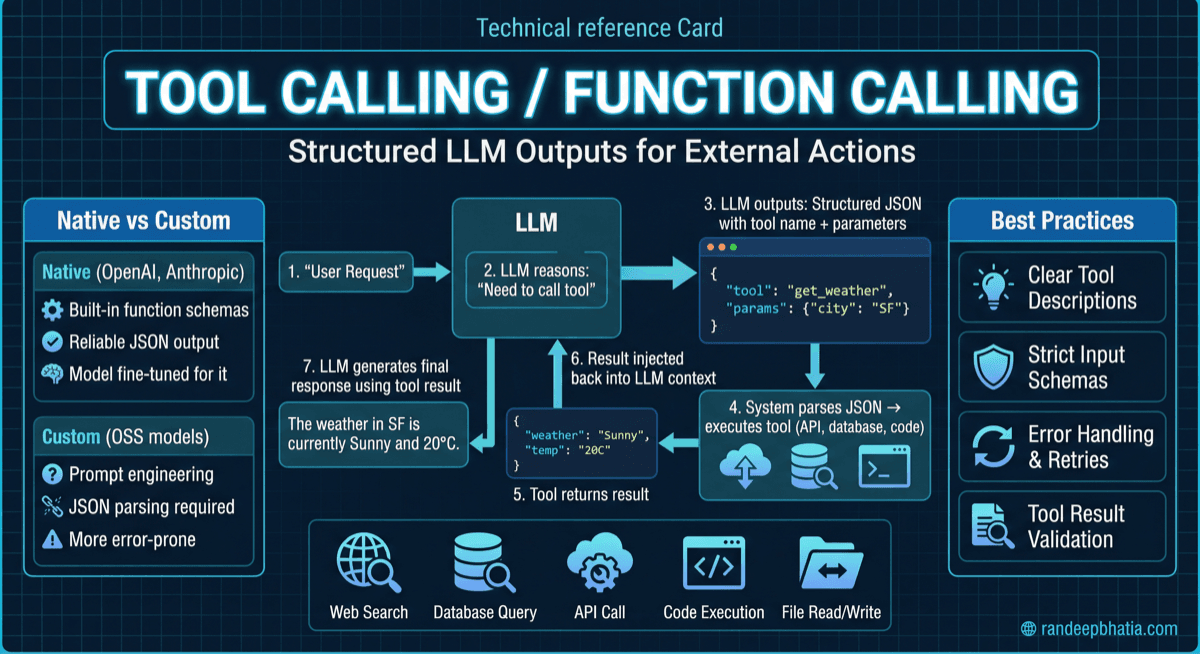
User request β†’ LLM generates tool call β†’ Orchestrator validates and executes β†’ Tool returns result β†’ LLM incorporates result β†’ Final response to user

Best For
  • Simple chatbots with limited tool needs
  • Low-latency requirements with fast tools
  • Prototyping and initial implementations
  • Single-tool interactions
Limitations
  • Sequential execution limits throughput
  • Long-running tools block the entire request
  • No support for complex multi-step workflows
  • Limited error recovery options
Scaling Characteristics

Scales linearly with request volume; latency is sum of LLM inference time plus tool execution time; each request is independent.

Integration Points

LLM API

Generates tool calls based on conversation context and available tool definitions; interprets tool results to continue reasoning or formulate responses.

Interfaces:
Chat completions API with tool/function parametersStreaming responses with tool call chunksTool result submission endpoint

Different providers have varying tool-calling formats and capabilities; model version affects tool-calling accuracy; token limits constrain tool definitions and results.

Tool Registry

Maintains the catalog of available tools with their schemas, descriptions, and metadata; supports dynamic tool registration and discovery.

Interfaces:
Tool registration APITool schema retrievalTool capability queriesVersion management

Tool descriptions must be optimized for LLM understanding; schema validation prevents malformed tool definitions; versioning enables backward compatibility.

Execution Engine

Receives tool call requests, validates arguments, executes the tool implementation, and returns results; handles timeouts, retries, and error conditions.

Interfaces:
Tool invocation APIArgument validationResult formattingError reporting

Must handle concurrent executions safely; timeout configuration balances responsiveness and completion; retry logic must respect idempotency.

Authentication Service

Manages credentials and tokens required for tool execution; handles OAuth flows, API key rotation, and permission verification.

Interfaces:
Token retrieval APIOAuth callback handlersPermission check endpointsCredential storage

Credentials must never be exposed to the LLM; token refresh must be transparent to tool execution; audit logging of authentication events is essential.

Rate Limiter

Controls the frequency of tool invocations to prevent abuse, manage costs, and respect external API limits.

Interfaces:
Rate check before executionQuota trackingLimit configurationOverage handling

Limits should be configurable per tool, user, and time window; graceful degradation when limits are reached; monitoring of limit utilization.

Result Cache

Stores tool results for reuse, reducing latency and cost for repeated queries with appropriate invalidation strategies.

Interfaces:
Cache lookupCache storageInvalidation triggersCache statistics

Cache keys must capture all relevant parameters; TTL should match data freshness requirements; cache size limits prevent unbounded growth.

Monitoring System

Collects metrics, logs, and traces from tool execution for observability, debugging, and optimization.

Interfaces:
Metric emissionLog aggregationDistributed tracingAlert integration

Correlation IDs enable end-to-end tracing; sensitive data must be redacted from logs; real-time dashboards support operational awareness.

Security Gateway

Enforces security policies on tool invocations, including input validation, output sanitization, and access control.

Interfaces:
Policy evaluationInput sanitizationOutput filteringThreat detection

Must protect against prompt injection via tool results; sensitive data filtering prevents leakage; anomaly detection identifies potential attacks.

Decision Framework

βœ“ If Yes

Tool-calling is likely needed for data freshness; proceed to evaluate specific tool requirements.

βœ— If No

Consider whether the model's built-in knowledge is sufficient; tool-calling may add unnecessary complexity.

Considerations

Training data cutoff dates vary by model; some information (stock prices, weather) is always stale; other information (historical facts) remains accurate.

Technical Deep Dive

Overview

Tool-calling operates through a structured interaction between the LLM, an orchestration layer, and external tool implementations. The process begins when the LLM receives a user request along with definitions of available tools, typically formatted as JSON schemas describing each tool's name, description, and parameters. Based on this context, the LLM determines whether a tool call is needed and, if so, generates a structured output specifying the tool name and arguments rather than a natural language response. The orchestration layer intercepts this tool call output, validates the arguments against the tool schema, and dispatches the request to the appropriate tool implementation. The tool executes its operationβ€”whether querying a database, calling an API, or performing a calculationβ€”and returns a result. This result is then formatted and injected back into the conversation context as a tool response message. The LLM receives this tool response and continues its reasoning, potentially generating another tool call if more information is needed, or producing a final natural language response that incorporates the tool results. This loop can continue for multiple iterations in complex scenarios, with the LLM orchestrating a sequence of tool calls to accomplish the user's goal. Modern implementations support parallel tool calling, where the LLM can request multiple independent tools in a single response, allowing the orchestration layer to execute them concurrently. This significantly reduces latency for tasks requiring information from multiple sources. The entire process is designed to be transparent to the user, who sees only the final response that seamlessly integrates tool-derived information with the LLM's reasoning.

Step-by-Step Process

Available tools are defined using JSON schemas and injected into the system prompt or a dedicated tools parameter. Each definition includes the tool name, a natural language description explaining when and how to use it, and a parameter schema specifying required and optional arguments with their types and constraints.

⚠️ Pitfalls to Avoid

Vague descriptions lead to misuse; overly complex schemas confuse the model; too many tools degrade selection accuracy; descriptions that don't match actual behavior cause errors.

Under The Hood

At the model level, tool-calling capability is achieved through specialized training that teaches the model to recognize when tools are appropriate and to generate syntactically correct function calls. This training typically involves fine-tuning on datasets of conversations that include tool usage, teaching the model the format for tool calls and how to interpret tool results. The model learns to output a special token or structured format indicating a tool call rather than continuing with natural language generation. The tool definitions provided at inference time are processed as part of the prompt context, meaning the model's understanding of each tool comes entirely from the description and schema provided. This is why description quality is so criticalβ€”the model has no other information about what the tool does or how to use it correctly. The model essentially performs few-shot learning on tool usage based on the definitions alone. Under the hood, the orchestration layer maintains state about the current conversation, pending tool calls, and execution context. When a tool call is generated, the orchestrator must parse the structured output, which may be interleaved with natural language in some implementations. Modern APIs typically return tool calls as distinct objects separate from text content, simplifying parsing. The execution environment for tools varies widely. Simple tools may be in-process function calls, while others invoke external APIs over HTTP. The orchestrator manages connection pooling, retry logic, circuit breakers, and timeout handling. For parallel tool calls, the orchestrator dispatches requests concurrently and aggregates results, handling partial failures gracefully. Result injection requires careful attention to context management. Each tool call and response consumes tokens from the context window, and long conversations with many tool calls can exhaust available context. Strategies like summarizing previous tool results or implementing sliding window approaches help manage this constraint. The format of injected results also mattersβ€”structured JSON may be more precise but harder for the model to reason about than formatted text. Security boundaries in tool-calling systems operate at multiple levels. Input validation prevents malformed requests from reaching tools. Authorization checks ensure the caller has permission for the requested operation. Output sanitization prevents tool results from containing content that could manipulate subsequent model behavior. Audit logging creates accountability for all tool invocations. These layers work together to create defense in depth against both accidental misuse and intentional attacks.

Failure Modes

Root Cause

The LLM generates a call to a tool that doesn't exist, typically due to confusion with similarly-named tools, training data artifacts, or prompt injection.

Symptoms
  • Tool call references undefined function name
  • Validation errors for unknown tools
  • Repeated attempts to call non-existent tools
Impact

Request fails; user receives error or degraded response; may trigger retry loops.

Prevention

Use distinctive tool names; provide clear descriptions; validate tool names before execution; limit tool set size.

Mitigation

Return helpful error message to LLM; suggest similar valid tools; fall back to no-tool response.

Operational Considerations

Key Metrics (15)

Percentage of tool invocations that complete successfully without errors.

Normal95-99%
AlertBelow 90% for 5 minutes
ResponseInvestigate failing tools; check external service health; review recent deployments.

Dashboard Panels

Tool call volume over time (by tool, by status)Latency distribution heatmap (by tool)Success/failure rate trendsExternal service health statusRate limit utilization gaugesCost accumulation (daily/weekly/monthly)Cache performance metricsError breakdown by type and toolTop tools by usage and costConversation flow visualization with tool calls

Alerting Strategy

Implement tiered alerting with different severity levels: P1 for complete tool system failure affecting all users, P2 for individual critical tool failures or significant degradation, P3 for elevated error rates or latency, P4 for trend anomalies requiring investigation. Use anomaly detection for metrics without fixed thresholds. Implement alert aggregation to prevent alert storms during cascading failures. Ensure on-call rotation has runbooks for each alert type.

Cost Analysis

Cost Drivers

(10)

LLM API Token Consumption

Impact:

Tool definitions, calls, and results all consume tokens, often doubling or tripling token usage compared to non-tool conversations. Each tool call requires an additional LLM inference round.

Optimization:

Minimize tool definition verbosity; truncate large results; cache tool results to avoid re-querying; batch related queries; use smaller models for simple tool selection.

External API Costs

Impact:

Many tools wrap paid APIs (search, data providers, cloud services) with per-call or per-data-volume pricing. High-volume tool usage can incur significant external costs.

Optimization:

Implement aggressive caching; batch API requests where possible; negotiate volume discounts; use free tiers strategically; monitor and alert on cost anomalies.

Compute Resources for Tool Execution

Impact:

Tool execution requires compute resources for validation, execution, and result processing. Complex tools may require significant CPU, memory, or specialized hardware.

Optimization:

Right-size compute resources; use serverless for variable workloads; optimize tool implementations; implement resource limits per tool.

Infrastructure for Orchestration

Impact:

The orchestration layer, caching, monitoring, and supporting infrastructure add baseline costs regardless of usage volume.

Optimization:

Use managed services where cost-effective; consolidate infrastructure across tools; implement auto-scaling; optimize for cost during low-traffic periods.

Multi-Turn Conversations

Impact:

Each turn in a tool-calling conversation requires LLM inference, and complex tasks may require many turns. ReAct patterns can multiply costs significantly.

Optimization:

Implement step limits; optimize prompts to reduce turns; use parallel tool calls; cache intermediate results; consider simpler patterns for routine tasks.

Error Handling and Retries

Impact:

Failed tool calls that are retried double or triple the cost of that operation. High error rates significantly increase costs.

Optimization:

Improve tool reliability; implement smart retry logic; use circuit breakers to fail fast; cache successful results to avoid re-execution.

Monitoring and Logging

Impact:

Comprehensive logging and monitoring generate significant data volumes with associated storage and processing costs.

Optimization:

Implement log sampling for high-volume tools; use appropriate retention periods; compress and archive old logs; filter unnecessary detail from production logs.

Development and Maintenance

Impact:

Building, testing, and maintaining tools requires engineering time. Complex tool ecosystems have ongoing maintenance overhead.

Optimization:

Standardize tool patterns; invest in testing automation; document thoroughly; build reusable components; consider build vs. buy decisions.

Security and Compliance

Impact:

Security measures, auditing, and compliance requirements add overhead to tool-calling systems, especially in regulated industries.

Optimization:

Automate security scanning; implement efficient audit logging; use compliance frameworks to avoid redundant controls; balance security with operational efficiency.

Data Transfer

Impact:

Moving data between LLM APIs, tool services, and storage incurs network transfer costs, especially across cloud regions or providers.

Optimization:

Co-locate services where possible; compress data in transit; minimize unnecessary data transfer; use regional endpoints.

Cost Models

Per-Conversation Cost

Cost = (input_tokens Γ— input_price) + (output_tokens Γ— output_price) + (tool_calls Γ— avg_tool_cost) + (turns Γ— per_turn_overhead)
Variables:
input_tokens: Total tokens in prompts including tool definitionsoutput_tokens: Total tokens in responses including tool callstool_calls: Number of tool invocationsavg_tool_cost: Average cost per tool executionturns: Number of conversation turns
Example:

A 5-turn conversation with 2 tool calls: (3000 Γ— $0.01/1K) + (1500 Γ— $0.03/1K) + (2 Γ— $0.05) + (5 Γ— $0.001) = $0.03 + $0.045 + $0.10 + $0.005 = $0.18 per conversation

Monthly Operating Cost

Monthly_Cost = (daily_conversations Γ— 30 Γ— per_conversation_cost) + infrastructure_baseline + (peak_capacity Γ— overage_rate)
Variables:
daily_conversations: Average conversations per dayper_conversation_cost: From per-conversation modelinfrastructure_baseline: Fixed monthly infrastructure costspeak_capacity: Additional capacity for traffic spikesoverage_rate: Cost of exceeding baseline capacity
Example:

10,000 daily conversations at $0.18 each: (10000 Γ— 30 Γ— $0.18) + $500 + (20% Γ— $200) = $54,000 + $500 + $40 = $54,540/month

Cost per User Action

Action_Cost = conversation_cost / successful_actions_per_conversation
Variables:
conversation_cost: Total cost of conversationsuccessful_actions_per_conversation: Number of completed user goals
Example:

If average conversation costs $0.18 and completes 1.5 user actions: $0.18 / 1.5 = $0.12 per successful action

Tool-Specific ROI

Tool_ROI = (value_generated - tool_cost) / tool_cost Γ— 100%
Variables:
value_generated: Revenue or cost savings from tool usagetool_cost: Total cost of tool development and operation
Example:

A booking tool generates $10,000/month in bookings with $500/month cost: ($10,000 - $500) / $500 Γ— 100% = 1900% ROI

Optimization Strategies

  • 1Implement result caching with appropriate TTLs to avoid redundant tool executions
  • 2Use smaller, faster models for simple tool selection before escalating to larger models
  • 3Batch related tool calls into single operations where APIs support it
  • 4Implement request deduplication to prevent duplicate tool calls within short windows
  • 5Use streaming responses to provide faster perceived performance without additional calls
  • 6Optimize tool descriptions to minimize token consumption while maintaining clarity
  • 7Implement tiered tool access with expensive tools requiring explicit user confirmation
  • 8Use asynchronous processing for non-urgent tool operations to enable batching
  • 9Monitor and alert on cost anomalies to catch runaway spending early
  • 10Negotiate volume discounts with external API providers based on usage projections
  • 11Implement cost allocation and chargeback to encourage efficient usage patterns
  • 12Use spot/preemptible instances for non-critical tool execution workloads

Hidden Costs

  • πŸ’°Engineering time for tool development, testing, and maintenance
  • πŸ’°Opportunity cost of context window space consumed by tool definitions
  • πŸ’°Increased latency affecting user experience and conversion rates
  • πŸ’°Security review and compliance overhead for each new tool
  • πŸ’°Debugging and incident response for tool-related issues
  • πŸ’°Documentation and training for tool usage patterns
  • πŸ’°Technical debt from quick tool implementations
  • πŸ’°Vendor lock-in from tool-specific implementations

ROI Considerations

Tool-calling ROI should be evaluated across multiple dimensions beyond direct cost savings. User experience improvements from real-time data access and task completion capabilities can increase engagement and retention. Reduced hallucination through grounded responses improves trust and reduces support burden. Automation of previously manual tasks provides labor cost savings. However, ROI calculations must account for the full cost of tool development and maintenance, not just runtime costs. The highest ROI typically comes from tools that enable entirely new capabilities rather than incremental improvements. A tool that allows users to complete bookings or transactions directly provides clear, measurable value. Tools that simply retrieve information available elsewhere may have lower ROI unless they significantly improve user experience or accuracy. ROI also depends heavily on usage patterns. Tools with high cache hit rates have better economics than those requiring fresh execution every time. Tools used frequently across many users amortize development costs better than niche tools. Consider the marginal cost of each additional tool call when evaluating whether to expand tool capabilities. Finally, consider the strategic value of tool-calling capabilities. Being able to offer integrated, action-oriented AI experiences may provide competitive differentiation that justifies costs beyond direct ROI calculations. The ability to rapidly add new tools as business needs evolve provides optionality value that is difficult to quantify but strategically important.

Security Considerations

Threat Model

(10 threats)
1

Prompt Injection via User Input

Attack Vector

Malicious user crafts input that manipulates the LLM into calling unintended tools or passing harmful arguments.

Impact

Unauthorized data access, unintended actions, system compromise, data exfiltration.

Mitigation

Input sanitization; strict tool permissions; output validation; human confirmation for sensitive operations; anomaly detection on tool call patterns.

2

Prompt Injection via Tool Results

Attack Vector

External data sources return content containing instructions that manipulate subsequent LLM behavior.

Impact

Hijacked conversation flow; unauthorized tool calls; information disclosure; reputation damage.

Mitigation

Sanitize all tool outputs; use structured result formats; implement result validation; isolate tool result processing.

3

Privilege Escalation

Attack Vector

Attacker manipulates LLM into calling tools with higher privileges than the user should have.

Impact

Unauthorized access to sensitive data or operations; compliance violations; system compromise.

Mitigation

Implement tool-level authorization; validate permissions before execution; use principle of least privilege; audit all tool invocations.

4

Data Exfiltration

Attack Vector

Attacker uses tools to extract sensitive data and include it in responses or send it to external services.

Impact

Data breach; privacy violations; regulatory penalties; reputation damage.

Mitigation

Data classification and filtering; output scanning for sensitive data; network egress controls; audit logging.

5

Denial of Service via Tool Abuse

Attack Vector

Attacker triggers excessive tool calls to exhaust rate limits, consume resources, or incur costs.

Impact

Service degradation; excessive costs; resource exhaustion; impact on other users.

Mitigation

Rate limiting per user/session; cost caps; anomaly detection; circuit breakers; request throttling.

6

Tool Implementation Vulnerabilities

Attack Vector

Bugs in tool implementations allow injection attacks, buffer overflows, or other exploits.

Impact

System compromise; data corruption; service disruption; lateral movement.

Mitigation

Security code review; input validation in tools; sandboxing; regular security testing; dependency scanning.

7

Credential Exposure

Attack Vector

API keys, tokens, or other credentials are exposed through logs, error messages, or tool results.

Impact

Unauthorized access to external services; financial loss; data breach.

Mitigation

Credential management systems; log redaction; secure error handling; regular credential rotation.

8

Man-in-the-Middle on Tool Communications

Attack Vector

Attacker intercepts communications between orchestration layer and tools or external services.

Impact

Data interception; request manipulation; credential theft.

Mitigation

TLS for all communications; certificate pinning; mutual authentication; network segmentation.

9

Tool Confusion Attack

Attack Vector

Attacker registers malicious tool with similar name to legitimate tool, hoping LLM will select it.

Impact

Execution of malicious code; data theft; system compromise.

Mitigation

Strict tool registration controls; tool name validation; tool provenance verification; admin approval for new tools.

10

Replay Attacks

Attack Vector

Attacker captures and replays legitimate tool calls to perform unauthorized operations.

Impact

Duplicate transactions; unauthorized actions; resource consumption.

Mitigation

Request signing with timestamps; nonce validation; idempotency keys; short-lived tokens.

Security Best Practices

  • βœ“Implement defense in depth with multiple security layers (input validation, authorization, output filtering)
  • βœ“Apply principle of least privilege to all tool permissions
  • βœ“Sanitize all inputs before passing to tools and all outputs before returning to LLM
  • βœ“Use structured, typed tool interfaces rather than free-form string parameters
  • βœ“Implement comprehensive audit logging for all tool invocations
  • βœ“Require human confirmation for high-impact or irreversible operations
  • βœ“Use separate tools for read and write operations with different permission levels
  • βœ“Implement rate limiting and cost caps per user, session, and tool
  • βœ“Regularly rotate credentials and API keys used by tools
  • βœ“Conduct security reviews for all new tools before deployment
  • βœ“Monitor for anomalous tool usage patterns that may indicate attacks
  • βœ“Implement circuit breakers to limit blast radius of compromised tools
  • βœ“Use network segmentation to isolate tool execution environments
  • βœ“Encrypt sensitive data at rest and in transit
  • βœ“Maintain incident response procedures specific to tool-calling security events

Data Protection

  • πŸ”’Classify data handled by each tool according to sensitivity levels
  • πŸ”’Implement data masking for sensitive fields in tool results
  • πŸ”’Use tokenization for sensitive identifiers passed through tools
  • πŸ”’Encrypt tool result caches containing sensitive data
  • πŸ”’Implement data retention policies for tool logs and results
  • πŸ”’Provide data lineage tracking through tool execution chains
  • πŸ”’Implement right-to-deletion capabilities for tool-stored data
  • πŸ”’Use separate storage for different data classification levels
  • πŸ”’Implement access logging for all sensitive data access through tools
  • πŸ”’Conduct regular data protection impact assessments for tool systems

Compliance Implications

GDPR

Requirement:

Personal data processing must have legal basis; data subjects have rights to access, rectification, and deletion.

Implementation:

Implement data classification in tool results; provide mechanisms for data subject requests; document processing purposes; implement data minimization in tool designs.

HIPAA

Requirement:

Protected Health Information (PHI) must be safeguarded with administrative, physical, and technical controls.

Implementation:

Encrypt PHI in transit and at rest; implement access controls on health data tools; maintain audit trails; execute Business Associate Agreements with tool providers.

SOC 2

Requirement:

Systems must meet trust service criteria for security, availability, processing integrity, confidentiality, and privacy.

Implementation:

Document tool security controls; implement monitoring and alerting; maintain change management procedures; conduct regular audits.

PCI DSS

Requirement:

Cardholder data must be protected with specific technical and operational controls.

Implementation:

Isolate payment-related tools; implement strong access controls; encrypt cardholder data; maintain audit trails; conduct regular security assessments.

CCPA/CPRA

Requirement:

California consumers have rights regarding their personal information including disclosure, deletion, and opt-out.

Implementation:

Implement data inventory for tool data flows; provide consumer request mechanisms; document data sharing through tools.

AI Act (EU)

Requirement:

High-risk AI systems must meet requirements for transparency, human oversight, and risk management.

Implementation:

Document tool-calling decision processes; implement human oversight mechanisms; conduct risk assessments; maintain technical documentation.

Financial Services Regulations (various)

Requirement:

Financial transactions and advice must meet suitability, disclosure, and record-keeping requirements.

Implementation:

Implement appropriate disclaimers; maintain transaction records; ensure tools don't provide unauthorized financial advice; implement compliance checks.

Export Controls

Requirement:

Certain technologies and data cannot be shared with restricted parties or countries.

Implementation:

Screen tool users against restricted party lists; implement geographic restrictions; control access to sensitive tools.

Scaling Guide

Scaling Dimensions

Request Volume

Strategy:

Horizontal scaling of orchestration layer; load balancing across tool execution instances; queue-based processing for burst handling.

Limits:

Limited by LLM API rate limits, external service capacity, and database connection pools.

Considerations:

Ensure stateless orchestration for easy scaling; implement request queuing for graceful degradation; monitor queue depths.

Tool Count

Strategy:

Hierarchical tool organization; dynamic tool loading based on context; specialized agents for tool subsets.

Limits:

Context window limits constrain tool definitions; selection accuracy degrades beyond 15-20 tools.

Considerations:

Implement tool categorization; use tool discovery mechanisms; consider multi-agent architectures for large tool sets.

Concurrent Users

Strategy:

Session isolation; per-user rate limiting; fair scheduling across users.

Limits:

Limited by total system capacity and per-user resource allocation.

Considerations:

Implement user-level quotas; ensure isolation between user sessions; monitor per-user metrics.

Conversation Length

Strategy:

Context summarization; sliding window approaches; conversation archival and retrieval.

Limits:

Context window size; memory for conversation state; storage for conversation history.

Considerations:

Implement progressive summarization; archive old conversations; provide conversation reset options.

Geographic Distribution

Strategy:

Regional deployment of orchestration and tools; edge caching; geo-routing.

Limits:

Data residency requirements; cross-region latency; replication complexity.

Considerations:

Deploy tools close to users; implement regional data isolation; handle cross-region failover.

Tool Complexity

Strategy:

Dedicated compute for complex tools; async execution for long-running operations; result streaming.

Limits:

Compute resources; timeout constraints; user patience for long operations.

Considerations:

Match compute to tool requirements; implement progress indicators; consider breaking complex tools into stages.

Data Volume

Strategy:

Pagination for large results; streaming for continuous data; aggregation at source.

Limits:

Context window for results; network bandwidth; processing capacity.

Considerations:

Implement result truncation strategies; use summarization for large data; provide drill-down capabilities.

Integration Count

Strategy:

Standardized integration patterns; connection pooling; integration health monitoring.

Limits:

Maintenance burden; credential management complexity; failure correlation.

Considerations:

Use integration platforms where appropriate; implement consistent error handling; monitor integration health.

Capacity Planning

Key Factors:
Expected request volume (requests per second, daily active users)Average tool calls per requestTool execution latency distributionExternal API rate limits and quotasContext window utilization patternsCache hit rates and cache size requirementsPeak-to-average traffic ratioGrowth projections over planning horizon
Formula:Required_Capacity = (peak_rps Γ— avg_tools_per_request Γ— (1 - cache_hit_rate) Γ— safety_margin) / tools_per_instance
Safety Margin:

Typically 1.5-2x expected peak to handle traffic spikes and provide headroom for growth. Higher margins (2-3x) for critical systems or unpredictable traffic patterns.

Scaling Milestones

MVP (< 100 users)
Challenges:
  • Establishing basic patterns
  • Tool reliability
  • Initial security posture
Architecture Changes:

Single instance deployment; basic monitoring; manual scaling; focus on functionality over optimization.

Early Growth (100-1,000 users)
Challenges:
  • Reliability requirements increase
  • Cost visibility needed
  • Performance expectations rise
Architecture Changes:

Add redundancy; implement caching; establish monitoring baselines; automate deployments.

Growth (1,000-10,000 users)
Challenges:
  • Rate limits become constraining
  • Cost optimization critical
  • Operational complexity increases
Architecture Changes:

Horizontal scaling; advanced caching strategies; rate limit management; dedicated ops support.

Scale (10,000-100,000 users)
Challenges:
  • Multi-region requirements
  • Complex tool ecosystems
  • Sophisticated security needs
Architecture Changes:

Regional deployment; tool platform capabilities; advanced security controls; dedicated SRE team.

Large Scale (100,000-1M users)
Challenges:
  • Global distribution
  • Complex compliance requirements
  • Significant cost management
Architecture Changes:

Global infrastructure; compliance automation; cost allocation systems; platform team.

Massive Scale (1M+ users)
Challenges:
  • Custom infrastructure needs
  • Negotiated API agreements
  • Organizational complexity
Architecture Changes:

Custom solutions for bottlenecks; strategic vendor relationships; dedicated teams per domain.

Benchmarks

Industry Benchmarks

MetricP50P95P99 World Class
Tool Selection Accuracy92%88%82%>95%
Tool Call Latency300ms1.5s5s<200ms p50
Tool Call Success Rate97%94%90%>99%
End-to-End Response Time (with tools)2s5s10s<1.5s p50
Cache Hit Rate45%25%10%>60%
Tool Calls per Conversation2.5815Optimized for use case
Context Utilization55%75%90%<50% with full functionality
Cost per Tool Call$0.02$0.08$0.25<$0.01
Error Rate3%8%15%<1%
Retry Rate5%12%25%<3%
Time to Add New Tool2 days1 week3 weeks<4 hours
Tool Documentation Coverage70%50%30%100%

Comparison Matrix

ApproachFlexibilityLatencyCostAccuracyMaintenanceSecurity
LLM Tool-CallingHighMedium-HighMedium-HighHigh (grounded)MediumRequires attention
Pure LLM (no tools)MediumLowLowVariable (hallucination risk)LowLower risk
RAG OnlyLow-MediumMediumMediumHigh for static dataMediumModerate
Hardcoded IntegrationsLowLowLowHigh (deterministic)HighEasier to secure
Rule-Based SystemsLowVery LowVery LowLimited coverageVery HighPredictable
Hybrid (Tools + RAG)Very HighHighHighVery HighHighComplex

Performance Tiers

Basic

Simple tool set (<5 tools); basic error handling; minimal caching; manual monitoring

Target:

95% success rate; <3s p50 latency; basic cost tracking

Standard

Moderate tool set (5-15 tools); comprehensive error handling; caching implemented; automated monitoring

Target:

97% success rate; <2s p50 latency; cost optimization in place

Advanced

Large tool set (15+ tools); sophisticated orchestration; aggressive caching; full observability

Target:

99% success rate; <1s p50 latency; optimized cost per action

Enterprise

Platform capabilities; self-service tools; multi-region; compliance automation

Target:

99.9% success rate; <500ms p50 latency; predictable cost model

World-Class

Custom infrastructure; ML-optimized tool selection; real-time optimization; industry-leading performance

Target:

99.99% success rate; <200ms p50 latency; best-in-class cost efficiency

Real World Examples

Real-World Scenarios

(8 examples)
1

Customer Service Bot with Order Management

Context

E-commerce company implementing AI-powered customer service that can look up orders, process returns, and update shipping addresses without human intervention.

Approach

Implemented tools for order lookup (read-only), return initiation (requires confirmation), and address update (with validation). Used human-in-the-loop for refunds above threshold. Cached order data for 5 minutes to reduce database load.

Outcome

70% of customer inquiries resolved without human escalation. Average handle time reduced from 8 minutes to 2 minutes. Customer satisfaction improved 15%.

Lessons Learned
  • πŸ’‘Tool descriptions needed multiple iterations to achieve reliable selection
  • πŸ’‘Confirmation flows for state changes built user trust
  • πŸ’‘Caching order data significantly reduced costs
  • πŸ’‘Edge cases (cancelled orders, split shipments) required special handling
  • πŸ’‘Integration with existing CRM was more complex than anticipated
2

Research Assistant with Multi-Source Search

Context

Professional services firm building internal research assistant that searches across internal knowledge base, public web, and proprietary databases.

Approach

Implemented parallel tool execution for simultaneous searches across sources. Used result ranking to prioritize most relevant results. Implemented source attribution for compliance. Cached search results with 1-hour TTL.

Outcome

Research time reduced by 60%. Improved consistency in research quality. Better compliance with source attribution requirements.

Lessons Learned
  • πŸ’‘Parallel execution dramatically improved user experience
  • πŸ’‘Result deduplication across sources was essential
  • πŸ’‘Source credibility scoring improved result quality
  • πŸ’‘Large result sets required intelligent truncation
  • πŸ’‘Users wanted to see which sources were searched
3

DevOps Assistant with Infrastructure Management

Context

Technology company building assistant for engineers to query metrics, search logs, and perform limited infrastructure operations.

Approach

Strict permission model with read-only tools for most users, write tools requiring elevated permissions. Implemented approval workflow for destructive operations. Comprehensive audit logging for compliance.

Outcome

Reduced time to diagnose issues by 40%. Decreased on-call burden through self-service. Improved audit trail for infrastructure changes.

Lessons Learned
  • πŸ’‘Security review process was critical and time-consuming
  • πŸ’‘Engineers initially distrusted AI for infrastructure operations
  • πŸ’‘Gradual permission expansion built confidence
  • πŸ’‘Log search tools needed careful result size management
  • πŸ’‘Integration with existing RBAC was complex but necessary
4

Financial Planning Assistant

Context

Financial services company building assistant to help advisors with client portfolio analysis and scenario modeling.

Approach

Read-only tools for portfolio data and market information. Computation tools for scenario modeling. No tools for executing trades (compliance requirement). Strict data access controls based on advisor-client relationships.

Outcome

Advisors could prepare for client meetings 50% faster. Improved consistency in analysis across advisors. Better documentation of planning rationale.

Lessons Learned
  • πŸ’‘Compliance requirements significantly constrained tool design
  • πŸ’‘Computation tools for financial modeling were highly valued
  • πŸ’‘Data access controls required careful implementation
  • πŸ’‘Advisors wanted transparency into calculation methods
  • πŸ’‘Integration with existing planning software was essential
5

Healthcare Triage Assistant

Context

Healthcare system implementing assistant to help patients understand symptoms and navigate to appropriate care.

Approach

Tools for symptom checking (using approved medical databases), appointment scheduling, and provider lookup. No diagnostic tools (regulatory requirement). Clear disclaimers and escalation to human nurses for concerning symptoms.

Outcome

Reduced call center volume by 30%. Improved patient satisfaction with self-service options. Appropriate escalation for urgent cases.

Lessons Learned
  • πŸ’‘Regulatory constraints required extensive legal review
  • πŸ’‘Disclaimer and escalation logic was complex
  • πŸ’‘Integration with EHR systems required careful security
  • πŸ’‘Patient trust required transparency about AI limitations
  • πŸ’‘Accessibility requirements affected tool design
6

Content Creation Platform with Asset Management

Context

Media company building assistant for content creators to search assets, generate variations, and manage publishing workflows.

Approach

Tools for asset search, image generation, content scheduling, and analytics retrieval. Implemented approval workflow for publishing. Cached asset search results aggressively.

Outcome

Content production velocity increased 40%. More consistent brand compliance. Better utilization of existing asset library.

Lessons Learned
  • πŸ’‘Creative tools required careful prompt engineering
  • πŸ’‘Asset search relevance was critical for adoption
  • πŸ’‘Publishing approval workflow prevented costly mistakes
  • πŸ’‘Analytics tools were unexpectedly popular
  • πŸ’‘Integration with DAM system was technically challenging
7

Legal Document Assistant

Context

Law firm implementing assistant for attorneys to search case law, draft document sections, and manage matter information.

Approach

Read-only tools for case law search and matter lookup. Document generation tools with attorney review required. Strict confidentiality controls between matters.

Outcome

Research time reduced by 50%. Improved consistency in document drafting. Better matter organization.

Lessons Learned
  • πŸ’‘Confidentiality controls were paramount and complex
  • πŸ’‘Attorneys required high accuracy for trust
  • πŸ’‘Citation formatting was surprisingly difficult
  • πŸ’‘Integration with document management was essential
  • πŸ’‘Training on legal terminology improved tool selection
8

Supply Chain Optimization Assistant

Context

Manufacturing company building assistant for supply chain managers to query inventory, analyze demand, and coordinate with suppliers.

Approach

Tools for inventory queries, demand forecasting, supplier communication drafting, and order status tracking. Implemented caching for frequently accessed inventory data.

Outcome

Inventory queries resolved 70% faster. Improved demand forecast accuracy through easier scenario analysis. Better supplier communication consistency.

Lessons Learned
  • πŸ’‘Real-time inventory data was essential for trust
  • πŸ’‘Forecasting tools required careful uncertainty communication
  • πŸ’‘Supplier communication tools needed approval workflows
  • πŸ’‘Integration with ERP was the biggest technical challenge
  • πŸ’‘Users wanted to understand forecast methodology

Industry Applications

Financial Services

Portfolio analysis, risk assessment, compliance checking, client communication, market research

Key Considerations:

Strict regulatory requirements; audit trail requirements; data privacy; no unauthorized advice; integration with trading systems requires careful controls.

Healthcare

Patient triage, appointment scheduling, medical record queries, care coordination, clinical decision support

Key Considerations:

HIPAA compliance; clinical accuracy requirements; liability concerns; integration with EHR systems; patient safety paramount.

E-commerce

Customer service, order management, product recommendations, inventory queries, return processing

Key Considerations:

High volume requirements; real-time inventory accuracy; payment processing security; customer experience focus.

Legal

Case research, document drafting, matter management, contract analysis, compliance review

Key Considerations:

Confidentiality requirements; accuracy for legal validity; citation requirements; privilege concerns.

Manufacturing

Supply chain queries, quality management, maintenance scheduling, production planning, supplier coordination

Key Considerations:

Integration with ERP/MES systems; real-time production data; safety-critical operations; supplier data sharing.

Technology

DevOps automation, code assistance, documentation queries, incident management, infrastructure monitoring

Key Considerations:

Security for infrastructure access; integration with development tools; handling of sensitive credentials; audit requirements.

Education

Student support, course management, research assistance, administrative queries, learning personalization

Key Considerations:

Student privacy (FERPA); academic integrity; accessibility requirements; integration with LMS.

Government

Citizen services, document processing, compliance verification, case management, public information

Key Considerations:

Accessibility requirements; transparency obligations; security clearances; procurement constraints; public trust.

Real Estate

Property search, document preparation, market analysis, client communication, transaction management

Key Considerations:

MLS integration; regulatory compliance; document accuracy; client confidentiality.

Insurance

Claims processing, policy queries, underwriting support, customer service, fraud detection

Key Considerations:

Regulatory compliance; claims accuracy; privacy requirements; integration with policy systems.

Frequently Asked Questions

Frequently Asked Questions

(20 questions)

Terminology

Tool-calling and function calling are essentially synonymous terms for the same capability. 'Function calling' was the term popularized by OpenAI when they introduced the feature, while 'tool calling' or 'tool use' is used by Anthropic and has become the more general industry term. Both refer to the LLM's ability to generate structured requests to invoke external functions or APIs.

Implementation

Compatibility

Reliability

Security

Performance

Cost

Architecture

Testing

Design

Operations

Error Handling

Glossary

Glossary

(30 terms)
A

Agentic AI

AI systems that can take autonomous actions to accomplish goals, enabled by tool-calling.

Context: Broader category that tool-calling enables.

Argument Generation

The process by which the LLM generates specific parameter values for a tool call based on context.

Context: Must conform to tool schema for successful execution.

Audit Trail

A chronological record of system activities, including all tool invocations.

Context: Essential for security, compliance, and debugging.

B

Blast Radius

The scope of impact when a failure occurs, important for understanding cascade failures.

Context: Tool failures should have limited blast radius.

C

Cache Invalidation

The process of removing or updating cached data when it becomes stale.

Context: Critical for tool result caching accuracy.

Circuit Breaker

A pattern that prevents cascading failures by stopping requests to failing services.

Context: Important for tool-calling reliability.

Context Window

The maximum amount of text (in tokens) that an LLM can process in a single request.

Context: Constrains tool definitions and conversation history.

F

Fallback Tool

An alternative tool used when the primary tool fails or is unavailable.

Context: Part of graceful degradation strategy.

Function Calling

Synonym for tool-calling, popularized by OpenAI's API terminology.

Context: Often used interchangeably with tool-calling.

G

Graceful Degradation

System behavior that maintains partial functionality when components fail.

Context: Goal for tool-calling systems when tools are unavailable.

Grounding

Anchoring LLM responses in factual, external data rather than relying solely on training knowledge.

Context: Tool-calling enables grounding through real-time data access.

H

Human-in-the-Loop

A pattern where human approval is required before executing certain tool operations.

Context: Used for sensitive or high-risk operations.

I

Idempotency

The property that repeated execution of an operation produces the same result, important for safe retry logic.

Context: Critical consideration for tool design and error handling.

O

Observability

The ability to understand system behavior through metrics, logs, and traces.

Context: Essential for operating tool-calling systems in production.

Orchestration Layer

The software component that mediates between LLM outputs and tool execution, handling validation, dispatch, and result processing.

Context: Critical infrastructure component in tool-calling systems.

P

Parallel Tool Calling

The ability to execute multiple independent tool calls simultaneously to reduce total latency.

Context: Optimization technique for multi-tool queries.

Prompt Injection

An attack where malicious input manipulates LLM behavior, potentially causing unauthorized tool calls.

Context: Key security concern for tool-calling systems.

R

Rate Limiting

Controlling the frequency of operations to prevent abuse and manage resources.

Context: Applied to tool calls to manage costs and external API limits.

ReAct Pattern

Reasoning and Acting pattern where the LLM alternates between thinking about the task and taking actions via tools.

Context: Common pattern for complex, multi-step agent tasks.

S

Structured Output

LLM output constrained to follow a specific format or schema, such as JSON.

Context: Tool calls are a form of structured output.

T

Token

The basic unit of text processing for LLMs, roughly 4 characters or 0.75 words in English.

Context: Tool definitions and results consume tokens from context window.

Tool Call ID

A unique identifier for a specific tool invocation, used to correlate calls with results.

Context: Essential for tracking and debugging.

Tool Chaining

Executing multiple tools in sequence where each tool's output informs the next.

Context: Enables complex multi-step workflows.

Tool Description

Natural language explanation of what a tool does and when to use it, critical for LLM understanding.

Context: Quality directly impacts tool selection accuracy.

Tool Registry

A catalog of available tools with their schemas, implementations, and metadata.

Context: Enables tool discovery and management.

Tool Result

The output returned by a tool after execution, which is injected back into the conversation for the LLM to process.

Context: Must be formatted appropriately for LLM consumption.

Tool Schema

A structured definition of a tool including its name, description, parameters, and return type, typically in JSON Schema format.

Context: Provided to the LLM to enable understanding and correct usage of tools.

Tool Selection

The process by which the LLM determines which tool (if any) to invoke based on user intent and available tools.

Context: Critical for tool-calling accuracy.

Tool-Calling

The capability of an LLM to generate structured requests to invoke external functions, APIs, or services.

Context: Core capability enabling LLMs to take actions beyond text generation.

W

Webhook

A callback mechanism where a service notifies another service when an event occurs.

Context: Used for asynchronous tool result delivery.

References & Resources

Academic Papers

  • β€’ Schick et al., 'Toolformer: Language Models Can Teach Themselves to Use Tools' (2023) - Foundational paper on training LLMs for tool use
  • β€’ Yao et al., 'ReAct: Synergizing Reasoning and Acting in Language Models' (2022) - Introduces the ReAct pattern for tool-using agents
  • β€’ Qin et al., 'Tool Learning with Foundation Models' (2023) - Comprehensive survey of tool learning approaches
  • β€’ Patil et al., 'Gorilla: Large Language Model Connected with Massive APIs' (2023) - Addresses API selection and argument generation
  • β€’ Shen et al., 'HuggingGPT: Solving AI Tasks with ChatGPT and its Friends in Hugging Face' (2023) - Multi-tool orchestration patterns
  • β€’ Mialon et al., 'Augmented Language Models: A Survey' (2023) - Broader context of LLM augmentation including tools
  • β€’ Parisi et al., 'TALM: Tool Augmented Language Models' (2022) - Early work on tool-augmented language models
  • β€’ Hao et al., 'ToolkenGPT: Augmenting Frozen Language Models with Massive Tools via Tool Embeddings' (2023) - Scaling tool-calling to large tool sets

Industry Standards

  • β€’ OpenAI Function Calling API Documentation - De facto standard for function calling interface
  • β€’ Anthropic Tool Use Documentation - Alternative implementation with Claude models
  • β€’ JSON Schema Specification (draft-07 and later) - Standard for tool parameter definitions
  • β€’ OpenAPI Specification 3.0+ - Standard for API documentation that can inform tool definitions
  • β€’ OAuth 2.0 / OpenID Connect - Standards for tool authentication
  • β€’ OWASP API Security Top 10 - Security considerations for tool APIs

Resources

  • β€’ OpenAI Cookbook: Function Calling Examples - Practical implementation patterns
  • β€’ Anthropic Claude Tool Use Guide - Best practices for Claude tool integration
  • β€’ LangChain Tools Documentation - Framework for building tool-calling applications
  • β€’ LlamaIndex Tools Guide - Alternative framework documentation
  • β€’ Microsoft Semantic Kernel Plugins - Enterprise patterns for tool integration
  • β€’ Hugging Face Transformers Agents - Open-source tool-calling implementations
  • β€’ Google Vertex AI Function Calling - Cloud platform implementation
  • β€’ AWS Bedrock Agents Documentation - Enterprise cloud patterns

Last updated: 2026-01-05 β€’ Version: v1.0 β€’ Status: citation-safe-reference

Keywords: tool calling, function calling, LLM tools, agent tools