VS
🎯

Agents vs Workflows

Comparisons & Decisionscitation-safe-reference📖 45-55 minutesUpdated: 2026-01-05

Executive Summary

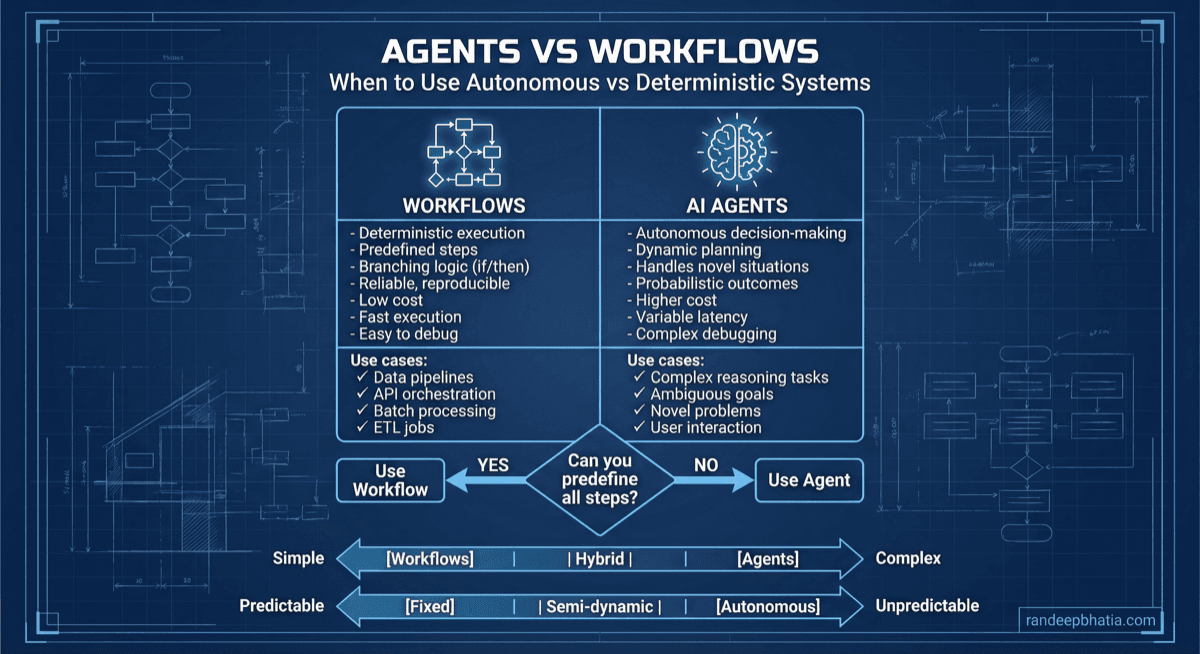
Agents are autonomous LLM-driven systems that dynamically decide their next actions, while workflows are deterministic pipelines with predefined execution paths and explicit control flow.

1

Agents excel at open-ended tasks requiring adaptive reasoning and tool selection, but introduce unpredictability, higher latency, and debugging complexity that scales with autonomy level.

2

Workflows provide predictable execution, easier debugging, and lower operational overhead, but lack flexibility for tasks where the optimal path cannot be predetermined.

3

The choice between agents and workflows is not binary—hybrid architectures that embed agentic components within workflow guardrails often provide the best balance of flexibility and reliability in production systems.

The Bottom Line

Choose workflows when task paths are known and predictability is paramount; choose agents when tasks require dynamic reasoning and tool selection. Most production systems benefit from hybrid approaches that constrain agent autonomy within workflow-defined boundaries to achieve both flexibility and operational reliability.

Definition

Agents are autonomous systems where a large language model iteratively decides which actions to take, which tools to invoke, and when to terminate, based on dynamic reasoning about the current state and goals.

Workflows are deterministic orchestration patterns where the sequence of operations, branching logic, and data flow are explicitly defined in advance, with the LLM serving as a component within a predetermined execution graph.

Extended Definition

The fundamental distinction lies in where control resides: agents place control within the LLM's reasoning loop, allowing the model to determine execution paths at runtime, while workflows place control in external orchestration logic that invokes LLM capabilities at specific, predetermined points. Agents operate through iterative cycles of observation, reasoning, and action, potentially taking different paths on each execution even with identical inputs. Workflows execute along predefined paths where branching is explicit and deterministic, ensuring reproducible behavior. This distinction has profound implications for reliability, debuggability, cost, latency, and the types of tasks each approach can effectively handle.

Etymology & Origins

The term 'agent' in AI derives from philosophical and economic concepts of autonomous actors capable of independent decision-making, formalized in AI through work on intelligent agents in the 1990s. The term 'workflow' originates from business process management and industrial engineering, describing sequences of tasks that transform inputs to outputs. In the LLM context, these terms were adapted around 2023-2024 as practitioners distinguished between autonomous LLM loops (agents) and orchestrated LLM pipelines (workflows).

Also Known As

Autonomous agents vs deterministic pipelinesAgentic systems vs orchestrated chainsDynamic reasoning loops vs static DAGsSelf-directed AI vs scripted AIAdaptive orchestration vs fixed orchestrationReAct patterns vs chain patternsGoal-driven systems vs task-driven systemsIterative agents vs sequential workflows

Not To Be Confused With

Multi-agent systems vs single workflows

Multi-agent systems involve multiple autonomous agents collaborating or competing, which is orthogonal to the agent-vs-workflow distinction. A single agent can be compared to a workflow, and multi-agent systems can be orchestrated by workflows.

Chains vs workflows

Chains (as in LangChain) are a specific implementation of workflows—sequential or branching compositions of LLM calls. All chains are workflows, but workflows can be implemented without chain abstractions.

Function calling vs tool use

Function calling is the mechanism by which LLMs invoke external capabilities. Both agents and workflows can use function calling—the distinction is whether the LLM decides which functions to call (agent) or the orchestrator decides (workflow).

Autonomy vs automation

Automation refers to executing tasks without human intervention. Both agents and workflows automate tasks. Autonomy specifically refers to self-directed decision-making, which characterizes agents but not workflows.

Reasoning vs execution

Both agents and workflows can incorporate LLM reasoning. The distinction is whether reasoning determines the execution path (agent) or reasoning occurs within a predetermined execution path (workflow).

Reactive vs proactive systems

Reactive systems respond to inputs; proactive systems initiate actions toward goals. Agents are typically proactive, but workflows can also be proactive when triggered by schedules or conditions.

Conceptual Foundation

Core Principles

(8 principles)

Mental Models

(6 models)

GPS Navigation vs Exploration

Workflows are like GPS navigation—you know the destination and the system follows predetermined routes with known decision points. Agents are like exploration—you have a goal but discover the path through investigation and adaptation.

Assembly Line vs Craftsperson

Workflows are assembly lines—each station performs a specific operation in sequence, optimized for throughput and consistency. Agents are craftspeople—they assess each piece individually and adapt their approach based on what they observe.

Script vs Improv

Workflows follow a script—the dialogue and actions are predetermined, ensuring consistent delivery. Agents do improv—they have goals and constraints but create the specific actions in the moment based on context.

Vending Machine vs Personal Shopper

Workflows are vending machines—you make a selection, and a predetermined sequence delivers the result. Agents are personal shoppers—they understand your needs and navigate options dynamically to find the best solution.

Railroad vs Off-Road Vehicle

Workflows run on rails—fast and efficient on predetermined tracks, but limited to where tracks exist. Agents are off-road vehicles—slower and less efficient, but capable of navigating terrain without predetermined paths.

Compiled vs Interpreted Execution

Workflows are like compiled programs—the execution path is determined before runtime, enabling optimization and predictability. Agents are like interpreted programs—decisions are made at runtime, enabling flexibility but with overhead.

Key Insights

(10 insights)

The agent-vs-workflow decision is rarely binary in production systems; most successful implementations use hybrid architectures where workflows orchestrate agent components within bounded contexts.

Agent unpredictability is not inherently bad—it enables handling of novel situations—but it must be bounded by guardrails, timeouts, and fallback workflows to be production-safe.

Workflow rigidity is not inherently limiting—it enables reliability and optimization—but it requires comprehensive upfront analysis to handle all expected scenarios.

The cost difference between agents and workflows can be 5-50x for the same task, primarily driven by the number of reasoning iterations agents require.

Debugging agents requires trace-based analysis of reasoning chains, while debugging workflows requires graph-based analysis of execution paths—different tools and skills are needed.

Agent reliability improves with task specificity—narrow, well-defined agent goals outperform broad, ambiguous goals—suggesting that decomposition into focused agents often beats monolithic agents.

Workflow maintainability degrades with branching complexity—workflows with many conditional paths become harder to test and modify than equivalent agent implementations.

The choice between agents and workflows should be revisited as LLM capabilities evolve—tasks that required agent flexibility in 2024 may be achievable with workflows as models improve.

Observability requirements differ fundamentally: agents need reasoning traces and decision explanations; workflows need execution graphs and timing breakdowns.

Human oversight is easier to implement in workflows (explicit checkpoints) but more valuable in agents (where autonomous decisions carry higher risk).

When to Use

Ideal Scenarios

(12)

Use agents when the task requires dynamic tool selection from a large toolset where the optimal sequence cannot be predetermined, such as research tasks that may require web search, document analysis, calculation, or code execution depending on what is discovered.

Use agents when handling open-ended queries where user intent must be clarified through interaction and the response strategy depends on the clarified intent.

Use agents when the task involves multi-step reasoning where each step's output determines not just the next step's input but which type of step should occur next.

Use workflows when the task has a known, finite set of paths that can be enumerated and tested, such as document processing pipelines with defined extraction, validation, and transformation stages.

Use workflows when latency and cost predictability are critical requirements, such as user-facing applications with SLA commitments.

Use workflows when regulatory or compliance requirements mandate explainable, auditable execution paths that can be documented and verified.

Use workflows when the task involves integration with multiple external systems where error handling and retry logic must be explicitly defined for each integration point.

Use agents when building systems that must handle adversarial or unexpected inputs gracefully by reasoning about appropriate responses rather than failing on unhandled cases.

Use workflows when building high-throughput systems where the overhead of agent reasoning would create unacceptable bottlenecks.

Use agents when the task requires learning or adaptation within a session, such as tutoring systems that adjust their approach based on student responses.

Use workflows when the task is part of a larger data pipeline where deterministic behavior is required for downstream processing and data consistency.

Use hybrid approaches when core task logic is well-defined but specific subtasks require adaptive reasoning, such as a document processing workflow that uses an agent for complex entity extraction.

Prerequisites

(8)
1

For agents: Robust tool definitions with clear descriptions, input schemas, and error handling that enable the LLM to reason about tool selection and usage.

2

For agents: Comprehensive observability infrastructure capable of capturing reasoning traces, tool invocations, and decision points for debugging and monitoring.

3

For agents: Defined guardrails including maximum iterations, timeout limits, cost caps, and fallback behaviors to prevent runaway execution.

4

For workflows: Complete enumeration of expected scenarios and edge cases that the workflow must handle, with explicit branches for each.

5

For workflows: Well-defined interfaces between workflow stages including input/output schemas, error types, and retry semantics.

6

For both: Clear success criteria that can be evaluated programmatically or through human review to determine if the system is performing correctly.

7

For both: Sufficient LLM capability for the task complexity—neither agents nor workflows can compensate for fundamental model limitations.

8

For agents: Team expertise in prompt engineering for reasoning and decision-making, which differs from prompt engineering for generation tasks.

Signals You Need This

(10)

You're building extensive conditional logic to handle variations that could be better handled by LLM reasoning—this suggests agent patterns might simplify the architecture.

Your workflow has grown to dozens of branches and edge cases, becoming difficult to maintain and test—consider whether agent flexibility could reduce complexity.

Users frequently encounter 'not supported' errors because their requests don't match predefined workflow paths—agents could handle novel requests more gracefully.

You need to add new capabilities frequently and workflow modifications are becoming a bottleneck—agent tool addition is often simpler than workflow restructuring.

Your task success rate varies significantly based on input characteristics in ways that are hard to predict—agents can adapt to input variations.

You're spending significant effort on prompt engineering to force deterministic outputs from LLMs—workflows might be fighting the model's nature.

Debugging involves tracing through complex conditional logic to understand why a specific path was taken—this is a sign workflow complexity has exceeded maintainability.

You need to explain system decisions to users or auditors and the reasoning is implicit in workflow structure—agents can provide explicit reasoning traces.

Your system needs to handle multi-turn interactions where context from earlier turns affects later processing in complex ways—agents naturally maintain reasoning context.

You're implementing the same error handling and retry logic across many workflow stages—agents can reason about errors and recovery strategies.

Organizational Readiness

(7)

Engineering team has experience with LLM application development and understands the stochastic nature of LLM outputs and the implications for testing and reliability.

Organization has established observability practices and infrastructure capable of handling the tracing and monitoring requirements of the chosen approach.

Product stakeholders understand the tradeoffs between predictability and flexibility and can articulate which is more important for specific use cases.

Operations team has capacity to monitor and respond to the failure modes specific to the chosen approach—reasoning failures for agents, logic failures for workflows.

Organization has budget flexibility to accommodate the potentially higher and more variable costs of agent approaches during development and optimization.

Team has or can develop expertise in the specific debugging and testing approaches required—trace analysis for agents, graph testing for workflows.

Security and compliance teams have reviewed the implications of the chosen approach for data handling, audit trails, and regulatory requirements.

When NOT to Use

Anti-Patterns

(12)

Using agents for simple, linear tasks that could be accomplished with a single LLM call or a short workflow—agent overhead provides no benefit and adds cost and latency.

Using workflows for tasks where the number of potential paths is combinatorially large and most paths are rarely or never executed—the workflow becomes unmaintainable.

Implementing agents without iteration limits, timeouts, or cost caps—unbounded agents can enter infinite loops or consume excessive resources.

Building workflows that attempt to handle every possible edge case explicitly—this leads to brittle, complex systems that are harder to maintain than agent alternatives.

Using agents when deterministic, reproducible behavior is a hard requirement—agent stochasticity cannot be fully eliminated.

Implementing workflows with deeply nested conditionals that obscure the overall logic—this suggests the task may be better suited for agent reasoning.

Deploying agents without comprehensive observability—you cannot debug or improve what you cannot observe.

Using workflows when the task definition is still evolving rapidly—workflow modifications are more expensive than agent prompt updates.

Implementing agents that make high-stakes decisions without human oversight mechanisms—agent errors in critical domains can have severe consequences.

Building workflows that rely on LLM outputs being perfectly formatted—LLM outputs are inherently variable and workflows must handle this.

Using agents for high-throughput, low-latency requirements where the reasoning overhead is unacceptable.

Implementing workflows that duplicate logic across multiple branches instead of using shared components—this creates maintenance burden and inconsistency risk.

Red Flags

(10)

Agent reasoning traces show repetitive loops or circular reasoning patterns that don't converge toward task completion.

Workflow complexity metrics (cyclomatic complexity, branch count) are growing faster than feature additions.

Agent costs are unpredictable and frequently exceed budgets due to variable iteration counts.

Workflow test coverage is declining because the number of paths exceeds testing capacity.

Agent success rates vary dramatically across similar inputs without clear patterns explaining the variance.

Workflow modifications frequently introduce regressions in previously working paths.

Agent debugging requires extensive manual trace analysis because automated tools cannot identify issues.

Workflow execution times have high variance due to complex branching and conditional logic.

Agent tool usage patterns show inappropriate tool selection or tool misuse that prompt engineering cannot resolve.

Workflow error handling has become a significant portion of the codebase, exceeding the core logic.

Better Alternatives

(8)
1
When:

Simple extraction or transformation tasks with well-defined inputs and outputs

Use Instead:

Single LLM call with structured output

Why:

Agent overhead provides no benefit for tasks that don't require multi-step reasoning or tool use. A single, well-prompted LLM call is faster, cheaper, and more reliable.

2
When:

Tasks requiring perfect reproducibility for audit or compliance purposes

Use Instead:

Deterministic workflow with LLM components

Why:

Agent stochasticity cannot be fully controlled. Workflows provide the deterministic execution paths required for audit trails and compliance documentation.

3
When:

High-throughput processing where latency is critical

Use Instead:

Optimized workflow with parallel execution

Why:

Agent reasoning overhead adds latency to each iteration. Workflows can be optimized for parallelism and caching in ways that agents cannot.

4
When:

Tasks where errors have severe consequences and human oversight is required

Use Instead:

Workflow with explicit human-in-the-loop checkpoints

Why:

Workflows provide natural points for human review and approval. Agent decision points are implicit and harder to intercept.

5
When:

Integration-heavy tasks with many external system dependencies

Use Instead:

Workflow with explicit error handling per integration

Why:

Each integration has unique failure modes and retry semantics. Workflows allow explicit handling; agents may not reason correctly about integration-specific errors.

6
When:

Tasks where the LLM is primarily used for generation, not reasoning

Use Instead:

Simple chain or single call with post-processing

Why:

Agent patterns are designed for reasoning and decision-making. Generation tasks don't benefit from the agent loop and incur unnecessary overhead.

7
When:

Prototyping and rapid iteration on task definitions

Use Instead:

Lightweight agent with minimal tooling

Why:

Full workflow implementation is expensive to modify. A simple agent can explore the task space and inform eventual workflow design.

8
When:

Tasks requiring real-time responses under 1 second

Use Instead:

Pre-computed responses or simple workflow

Why:

Agent iteration inherently requires multiple LLM calls, making sub-second responses difficult. Workflows can be optimized for latency.

Common Mistakes

(10)

Assuming agents are always more capable than workflows—agents add flexibility but also add failure modes, cost, and complexity that may not be justified.

Building workflows without considering future extensibility—rigid workflows become technical debt when requirements evolve.

Implementing agents without proper guardrails and assuming the LLM will naturally terminate—agents require explicit bounds on iterations, time, and cost.

Over-engineering workflows with excessive abstraction layers that obscure the actual execution logic and make debugging difficult.

Underestimating agent debugging complexity—reasoning failures are harder to diagnose than logic errors in workflows.

Building workflows that assume LLM outputs will always match expected formats—LLM outputs are variable and must be validated and handled gracefully.

Deploying agents without comprehensive logging and tracing—agent behavior cannot be understood or improved without observability.

Creating workflows with implicit dependencies between stages that are not reflected in the workflow definition—this leads to subtle bugs.

Assuming agent performance will be consistent across different types of inputs—agents may excel at some input types and fail at others.

Building monolithic workflows instead of composable components—this limits reusability and increases maintenance burden.

Core Taxonomy

Primary Types

(8 types)

Agents that follow the Reasoning-Action pattern, explicitly generating reasoning traces before each action. The LLM alternates between thinking about the current state and deciding on the next action.

Characteristics
  • Explicit reasoning traces visible in outputs
  • Action selection based on articulated reasoning
  • Natural support for chain-of-thought prompting
  • Reasoning can be audited and debugged
Use Cases
Research and investigation tasksComplex problem-solving requiring explicit reasoningTasks where decision rationale must be explainable
Tradeoffs

Higher token usage due to reasoning traces, but better debuggability and often better task performance due to explicit reasoning.

Classification Dimensions

Autonomy Level

The degree to which the system makes independent decisions versus following predetermined logic or requiring human approval.

Fully autonomous (agent decides all actions)Guided autonomy (agent operates within constraints)Supervised autonomy (human approval for key decisions)Scripted (workflow determines all actions)

State Management

How the system manages and persists state across invocations, affecting reliability, scalability, and complexity.

Stateless (each invocation independent)Session state (state within a conversation)Persistent state (state across sessions)Shared state (state across multiple agents/workflows)

Tool Integration Depth

The extent and nature of external tool integration, affecting capability scope and risk profile.

No tools (LLM-only)Read-only tools (retrieval, search)Read-write tools (can modify external state)Autonomous tools (tools that themselves have agency)

Human Interaction Model

The role of humans in the execution process, affecting autonomy, safety, and user experience.

Fully automated (no human interaction)Human-initiated (human starts, system completes)Human-in-the-loop (human approvals during execution)Human-on-the-loop (human monitoring with intervention capability)

Execution Determinism

The predictability of execution paths given the same inputs, affecting testing and debugging approaches.

Fully deterministic (same inputs produce same execution)Statistically deterministic (same inputs produce similar execution)Non-deterministic (execution varies significantly)Adaptive (execution intentionally varies based on learning)

Error Handling Strategy

How the system handles errors and failures, affecting reliability and recovery characteristics.

Fail-fast (stop on first error)Retry-based (automatic retry with backoff)Fallback-based (alternative paths on failure)Reasoning-based (agent reasons about error recovery)

Evolutionary Stages

1

Single LLM Call

Starting point for most LLM applications. Teams typically spend 1-3 months here before needing more sophisticated approaches.

Direct LLM invocation with prompt engineering. No orchestration, no tools. Suitable for simple generation and extraction tasks.

2

Simple Workflow

Teams typically adopt simple workflows 2-4 months into LLM application development as task complexity increases.

Sequential chain of LLM calls with explicit data flow. Basic error handling. Suitable for multi-step tasks with known structure.

3

Complex Workflow

Teams typically reach this stage 4-8 months into development as production requirements emerge.

Branching, parallel, and iterative workflows with comprehensive error handling. Suitable for production systems with varied inputs.

4

Bounded Agent

Teams typically introduce bounded agents 6-12 months into development for specific use cases that workflows handle poorly.

Agent with limited tool set and strict guardrails operating within workflow-defined boundaries. Suitable for tasks requiring some adaptability.

5

Autonomous Agent System

Teams typically reach this stage 12+ months into development, often only for specific high-value use cases.

Fully autonomous agents or multi-agent systems with broad capabilities. Suitable for open-ended tasks requiring significant adaptability.

Architecture Patterns

Architecture Patterns

(8 patterns)

Router-Executor Pattern

A workflow pattern where an initial routing stage classifies the input and directs it to specialized executor workflows. Combines workflow predictability with handling of varied inputs.

Components
  • Router (LLM-based classifier)
  • Executor workflows (specialized for each input type)
  • Fallback executor (handles unclassified inputs)
  • Result aggregator
Data Flow

Input → Router → Selected Executor → Output. Router examines input and selects appropriate executor. Executor processes input according to its specialized workflow. Results are formatted consistently.

Best For
  • Multi-format input handling
  • Domain-specific processing requirements
  • Gradual capability expansion
Limitations
  • Router accuracy limits overall system accuracy
  • Adding new input types requires new executors
  • Fallback executor may be overloaded with edge cases
Scaling Characteristics

Scales horizontally by adding executor instances. Router can become a bottleneck at high throughput. Executor workflows can be scaled independently based on traffic distribution.

Integration Points

LLM Provider API

Core reasoning and generation capability for both agents and workflows. Provides the intelligence that drives decision-making and content generation.

Interfaces:
Completion API (text generation)Chat API (conversational interface)Function calling API (structured tool invocation)Embedding API (for retrieval integration)

API rate limits, latency variability, cost per token, model capability differences, and availability all affect system design. Both agents and workflows must handle API failures gracefully.

Vector Database

Stores and retrieves embeddings for semantic search. Enables retrieval-augmented approaches in both agents and workflows.

Interfaces:
Upsert (add/update vectors)Query (similarity search)Delete (remove vectors)Metadata filtering

Query latency affects overall system latency. Index size affects cost and query performance. Embedding model choice affects retrieval quality.

Tool Execution Environment

Executes tools invoked by agents or workflow stages. May include code execution, API calls, database queries, or other external operations.

Interfaces:
Tool invocation (with parameters)Result retrievalError reportingTimeout handling

Tool reliability directly affects system reliability. Security considerations for code execution. Resource limits for compute-intensive tools.

State Management System

Persists state for multi-turn interactions, long-running tasks, and recovery from failures. More complex for agents than workflows.

Interfaces:
State save/loadState versioningState queryingState expiration

State schema evolution, consistency guarantees, storage costs, and access latency all affect design choices.

Observability Platform

Captures traces, metrics, and logs for debugging and monitoring. Critical for both agents and workflows but with different focus areas.

Interfaces:
Trace ingestionMetric collectionLog aggregationQuery and visualization

Trace volume can be high for agents. Correlation across distributed components. Real-time alerting requirements.

Workflow Orchestration Engine

Manages workflow execution, including scheduling, state management, and error handling. Not applicable to pure agent architectures.

Interfaces:
Workflow definitionExecution triggeringStatus monitoringError handling hooks

Orchestration engine choice affects available patterns. Scalability of the engine itself. Integration with existing infrastructure.

Human-in-the-Loop Interface

Enables human review, approval, and feedback during execution. More naturally integrated in workflows than agents.

Interfaces:
Review queue presentationApproval/rejection actionsFeedback submissionEscalation handling

Latency impact of human review. Queue management and SLAs. Feedback incorporation mechanisms.

Authentication and Authorization System

Controls access to system capabilities and data. Affects both what tools agents can use and what workflow paths are available.

Interfaces:
Authentication (identity verification)Authorization (permission checking)Token managementAudit logging

Fine-grained permissions for tool access. Audit requirements for sensitive operations. Token refresh during long-running tasks.

Decision Framework

✓ If Yes

Workflow is likely appropriate. Proceed to evaluate complexity of the enumerated paths.

✗ If No

Agent or hybrid approach may be needed. Evaluate whether the open-endedness is fundamental or due to incomplete analysis.

Considerations

Be thorough in path enumeration. What seems open-ended may have a finite set of common paths with a fallback for rare cases.

Technical Deep Dive

Overview

Agents and workflows represent fundamentally different approaches to orchestrating LLM-powered systems, with distinct execution models, state management strategies, and control flow mechanisms. Understanding these differences at a technical level is essential for making informed architectural decisions and implementing robust systems. Agent execution follows an iterative loop pattern: the agent observes the current state (including task description, conversation history, and tool outputs), reasons about what action to take next, executes that action, and then observes the new state. This loop continues until the agent determines the task is complete or a termination condition is met. The key characteristic is that the LLM makes the decision about what happens next at each iteration. Workflow execution follows a graph-based pattern: the workflow definition specifies nodes (processing stages) and edges (transitions between stages). Execution proceeds by evaluating the current node, determining the next node based on explicit transition logic, and continuing until a terminal node is reached. The key characteristic is that the orchestration logic, not the LLM, determines what happens next. The technical implications of these different models affect every aspect of system design, from state management to error handling to observability. Agents require sophisticated state management to track reasoning history and enable recovery, while workflows can often use simpler state representations focused on stage outputs.

Step-by-Step Process

For agents: Initialize the agent with task description, available tools, system prompt, and any initial context. Create the agent state object that will track reasoning history. For workflows: Parse the workflow definition, validate the graph structure, and initialize the execution context with input data.

⚠️ Pitfalls to Avoid

Agent initialization with unclear task descriptions leads to poor performance. Workflow initialization with invalid graph structures (cycles in DAGs, missing transitions) causes runtime failures.

Under The Hood

At the implementation level, agents and workflows differ significantly in their core data structures and algorithms. Agent implementations typically center around a state object that accumulates the reasoning trace—a sequence of (thought, action, observation) tuples that grows with each iteration. This state must be serialized into the LLM prompt, which creates a fundamental tension between maintaining sufficient context for good reasoning and staying within context window limits. Sophisticated agent implementations use techniques like summarization, selective history inclusion, or external memory to manage this tension. The agent's decision-making relies on the LLM's ability to generate structured outputs indicating the next action. This is typically implemented using function calling capabilities (where available) or carefully designed prompts that elicit structured responses. The reliability of action parsing is critical—malformed outputs can derail the entire execution. Production agent implementations include robust parsing with fallback strategies and validation layers. Workflow implementations center around a graph data structure representing the workflow definition—nodes for stages and edges for transitions. Execution state is typically simpler than agent state: the current node, accumulated outputs from previous nodes, and any workflow-level context. The orchestration engine evaluates transition conditions (which may involve LLM calls for classification) to determine the next node. Workflow engines must handle concerns like parallel execution (for workflows with concurrent branches), state persistence (for long-running workflows), and transactional semantics (ensuring consistency when stages have side effects). These concerns are well-understood from traditional workflow systems and benefit from established patterns and tools. The integration between LLMs and these orchestration patterns introduces unique challenges. LLM outputs are inherently variable—even with temperature=0, outputs can differ due to batching effects and model updates. Both agents and workflows must handle this variability, but the strategies differ. Agents embrace variability as part of their adaptive nature, using guardrails to bound undesirable behaviors. Workflows attempt to minimize variability's impact through output validation, retry logic, and explicit handling of variant outputs. Performance characteristics also differ significantly. Agent latency is dominated by the number of LLM calls, which is unpredictable and depends on task complexity and agent reasoning quality. Workflow latency is more predictable—the number of LLM calls is bounded by the workflow structure, and parallel stages can reduce overall latency. Cost follows similar patterns: agent costs are variable and can spike for complex tasks, while workflow costs are more predictable and optimizable.

Failure Modes

Root Cause

Agent reasoning fails to make progress toward task completion, repeatedly taking the same or similar actions without advancing. Often caused by unclear task definitions, insufficient tool capabilities, or reasoning limitations.

Symptoms
  • Iteration count approaching or exceeding limits
  • Repetitive action patterns in reasoning trace
  • No new information being gathered or generated
  • Cost accumulation without corresponding progress
Impact

Resource exhaustion (cost, time), task failure, potential downstream failures if results are expected. User frustration if interactive.

Prevention

Clear task definitions, comprehensive tool sets, iteration limits, progress detection heuristics, task decomposition into smaller subtasks.

Mitigation

Hard iteration limits, cost caps, timeout enforcement, fallback to simpler approaches or human escalation when limits are approached.

Operational Considerations

Key Metrics (15)

Number of reasoning-action cycles per agent execution. Indicates task complexity and agent efficiency.

Normal3-10 iterations for typical tasks
AlertP95 > 15 iterations or any execution > 25 iterations
ResponseInvestigate high-iteration executions for reasoning loops or task clarity issues. Consider task decomposition.

Dashboard Panels

Task Success Rate Over Time (line chart with success/failure breakdown)Agent Iteration Distribution (histogram showing iteration count distribution)Workflow Stage Latency Heatmap (stages vs time with latency coloring)Cost per Task Trend (line chart with percentiles)Tool Invocation Success by Tool (bar chart per tool)End-to-End Latency Percentiles (P50, P95, P99 over time)Agent Termination Reasons (pie chart of termination types)Workflow Branch Distribution (sankey diagram of execution paths)Error Rate by Component (stacked area chart)Active Executions (gauge showing current load vs capacity)

Alerting Strategy

Implement tiered alerting with different severity levels and response expectations. Critical alerts (task success rate drop, cascade failures) require immediate response. Warning alerts (latency increases, cost spikes) require investigation within hours. Informational alerts (distribution changes, trend shifts) require review within days. Use anomaly detection for metrics without fixed thresholds. Implement alert correlation to avoid alert storms during systemic issues.

Cost Analysis

Cost Drivers

(10)

LLM API Calls

Impact:

Primary cost driver for both agents and workflows. Agents typically make more calls due to iterative reasoning. Cost scales with input and output token counts.

Optimization:

Reduce unnecessary calls through caching, prompt optimization, and efficient reasoning. Use smaller models where appropriate. Batch calls when possible.

Agent Iteration Count

Impact:

Each agent iteration incurs LLM costs. High iteration counts multiply costs. Unpredictable iteration counts make budgeting difficult.

Optimization:

Set iteration limits, improve task clarity to reduce iterations, implement early termination on success, use progress heuristics to detect stalls.

Context Window Usage

Impact:

Larger contexts mean more input tokens and higher costs. Agent history accumulation increases context over iterations.

Optimization:

Implement context summarization, use windowed history, limit tool output verbosity, decompose tasks to limit context growth.

Tool Execution Costs

Impact:

External tool calls may have direct costs (API fees) or indirect costs (compute, storage). Agents may make many tool calls.

Optimization:

Cache tool results where appropriate, batch tool calls, use cost-effective tool alternatives, limit unnecessary tool usage.

Workflow Stage Count

Impact:

Each LLM-based stage incurs costs. More stages mean more costs, but costs are predictable.

Optimization:

Combine stages where appropriate, use non-LLM processing for simple transformations, cache stage outputs.

Retry and Error Handling

Impact:

Retries multiply costs. Poor error handling leads to more retries. Agents may retry reasoning; workflows may retry stages.

Optimization:

Improve reliability to reduce retries, implement smart retry policies, use exponential backoff, set retry limits.

Model Selection

Impact:

Different models have different costs per token. More capable models cost more but may require fewer iterations.

Optimization:

Use appropriate model for task complexity, route simple tasks to cheaper models, use model cascading.

Observability Overhead

Impact:

Tracing and logging have storage and processing costs. Detailed agent traces can be large.

Optimization:

Sample traces for low-value executions, implement trace retention policies, use efficient trace formats.

State Storage

Impact:

Persisting agent and workflow state has storage costs. Long-running executions accumulate state.

Optimization:

Implement state cleanup policies, compress state, use appropriate storage tiers.

Compute Resources

Impact:

Orchestration, tool execution, and processing require compute. Parallel workflows need more concurrent resources.

Optimization:

Right-size compute resources, use serverless for variable loads, optimize processing code.

Cost Models

Agent Cost Model

Cost = Σ(iterations) × (input_tokens × input_price + output_tokens × output_price) + tool_costs
Variables:
iterations: number of reasoning cyclesinput_tokens: tokens in each prompt (grows with history)output_tokens: tokens in each responseinput_price: cost per input tokenoutput_price: cost per output tokentool_costs: costs of tool invocations
Example:

Agent with 5 iterations, average 2000 input tokens and 500 output tokens per iteration, at $0.01/1K input and $0.03/1K output: 5 × (2000 × $0.00001 + 500 × $0.00003) = 5 × ($0.02 + $0.015) = $0.175 per task

Workflow Cost Model

Cost = Σ(stages) × (stage_input_tokens × input_price + stage_output_tokens × output_price)
Variables:
stages: number of LLM-based stagesstage_input_tokens: tokens in each stage promptstage_output_tokens: tokens in each stage outputinput_price: cost per input tokenoutput_price: cost per output token
Example:

Workflow with 3 stages, average 1500 input tokens and 400 output tokens per stage, at $0.01/1K input and $0.03/1K output: 3 × (1500 × $0.00001 + 400 × $0.00003) = 3 × ($0.015 + $0.012) = $0.081 per task

Hybrid Cost Model

Cost = workflow_fixed_cost + (agent_probability × agent_variable_cost)
Variables:
workflow_fixed_cost: cost of workflow stagesagent_probability: probability of agent invocationagent_variable_cost: expected cost when agent is invoked
Example:

Workflow with $0.05 fixed cost, 20% agent invocation probability, $0.15 average agent cost: $0.05 + (0.2 × $0.15) = $0.08 expected cost per task

Total Cost of Ownership Model

TCO = direct_costs + development_costs + operational_costs + opportunity_costs
Variables:
direct_costs: LLM API, tools, infrastructuredevelopment_costs: engineering time for development and maintenanceoperational_costs: monitoring, debugging, incident responseopportunity_costs: business impact of failures and limitations
Example:

Consider not just per-task costs but full TCO. Agents may have lower development costs but higher operational costs. Workflows may have higher development costs but lower operational costs.

Optimization Strategies

  • 1Implement response caching for repeated or similar queries to avoid redundant LLM calls
  • 2Use model routing to direct simple tasks to cheaper models and complex tasks to capable models
  • 3Optimize prompts to reduce token count while maintaining quality
  • 4Implement early termination in agents when task completion is detected
  • 5Use streaming to enable early termination when sufficient output is generated
  • 6Batch similar requests to amortize fixed costs and enable bulk pricing
  • 7Implement context summarization to reduce input token growth in agents
  • 8Cache tool results to avoid redundant external calls
  • 9Use asynchronous processing to optimize resource utilization
  • 10Implement cost caps per task to prevent runaway costs
  • 11Monitor and alert on cost anomalies to catch issues early
  • 12Regularly review and optimize high-cost tasks and workflows

Hidden Costs

  • 💰Development time for debugging and optimization, which is higher for agents
  • 💰Operational overhead for monitoring and incident response
  • 💰Quality assurance costs for testing agents and workflows
  • 💰Technical debt from quick fixes and workarounds
  • 💰Opportunity cost of engineer time spent on maintenance vs new features
  • 💰Reputational cost of failures and poor user experiences
  • 💰Compliance and audit costs for regulated industries
  • 💰Training costs for team members learning new patterns

ROI Considerations

ROI analysis for agents vs workflows must consider both direct costs and indirect benefits. Agents may have higher per-task costs but can handle a broader range of tasks, potentially reducing the need for multiple specialized workflows. Workflows have lower per-task costs but require more upfront development and may need multiple workflows to cover the same task space. Consider the cost of handling edge cases: workflows require explicit handling (development cost) while agents may handle them naturally (operational cost). For high-volume, well-defined tasks, workflow ROI is typically better. For lower-volume, varied tasks, agent ROI may be better despite higher per-task costs. Also consider the cost of change: if task requirements evolve frequently, agent flexibility may provide better ROI than repeatedly modifying workflows. If requirements are stable, workflow efficiency provides better ROI over time. Finally, consider the cost of failures: agent failures may be more unpredictable and harder to diagnose, while workflow failures are typically more contained and easier to fix. The cost of failures depends on the criticality of the tasks and the availability of fallback options.

Security Considerations

Threat Model

(10 threats)
1

Prompt Injection via User Input

Attack Vector

Malicious user input that manipulates agent reasoning or workflow processing to perform unintended actions.

Impact

Unauthorized actions, data exfiltration, system manipulation, bypassing access controls.

Mitigation

Input sanitization, prompt hardening, output validation, least-privilege tool access, monitoring for anomalous behavior.

2

Tool Abuse by Compromised Agent

Attack Vector

Agent reasoning is manipulated to misuse tools, such as executing malicious code or accessing unauthorized data.

Impact

Data breach, system compromise, unauthorized actions, resource abuse.

Mitigation

Tool sandboxing, parameter validation, rate limiting, audit logging, human approval for sensitive operations.

3

Data Leakage Through LLM

Attack Vector

Sensitive data in prompts or context is exposed through LLM outputs or logging.

Impact

Privacy violations, compliance failures, competitive intelligence loss.

Mitigation

Data classification, sensitive data filtering, output scanning, secure logging practices, data minimization.

4

Workflow Manipulation

Attack Vector

Attacker manipulates workflow inputs or state to cause unintended execution paths.

Impact

Unauthorized actions, data manipulation, denial of service.

Mitigation

Input validation, state integrity checks, access controls on workflow modification, audit logging.

5

Agent Goal Manipulation

Attack Vector

Attacker influences agent reasoning to pursue malicious goals instead of intended goals.

Impact

Agent performs harmful actions while appearing to function normally.

Mitigation

Goal reinforcement, reasoning monitoring, output validation, human oversight for high-stakes actions.

6

Denial of Service via Resource Exhaustion

Attack Vector

Attacker triggers expensive agent iterations or workflow paths to exhaust resources.

Impact

Service unavailability, cost overruns, impact on other users.

Mitigation

Rate limiting, resource caps, cost limits, anomaly detection, request prioritization.

7

Supply Chain Attack on Tools

Attack Vector

Compromised tool or dependency executes malicious code when invoked by agent or workflow.

Impact

System compromise, data breach, unauthorized actions.

Mitigation

Tool vetting, dependency scanning, sandboxed execution, least-privilege permissions, integrity verification.

8

Insider Threat via Workflow Modification

Attack Vector

Malicious insider modifies workflow definitions to include backdoors or data exfiltration.

Impact

Unauthorized access, data theft, system manipulation.

Mitigation

Access controls, change review processes, audit logging, separation of duties, workflow integrity monitoring.

9

Model Extraction via Agent Probing

Attack Vector

Attacker uses agent interactions to extract information about underlying models or prompts.

Impact

Intellectual property theft, competitive intelligence loss, attack surface expansion.

Mitigation

Rate limiting, query monitoring, output filtering, prompt obfuscation where appropriate.

10

Cross-Tenant Data Leakage

Attack Vector

In multi-tenant systems, data from one tenant leaks to another through shared agent state or workflow context.

Impact

Privacy violations, compliance failures, trust erosion.

Mitigation

Strict tenant isolation, context clearing between requests, tenant-specific model instances, audit logging.

Security Best Practices

  • Implement input validation and sanitization for all user-provided data entering agents or workflows
  • Use least-privilege principles for tool access—agents should only have access to tools they need
  • Implement output validation to detect and filter sensitive data before returning to users
  • Use secure logging practices that redact sensitive information while maintaining debuggability
  • Implement rate limiting and resource caps to prevent denial of service attacks
  • Use sandboxed execution environments for code execution tools
  • Implement human approval workflows for high-stakes or irreversible actions
  • Maintain audit logs of all agent actions and workflow executions for forensic analysis
  • Use encryption for data at rest and in transit, including state storage
  • Implement access controls for workflow definitions and agent configurations
  • Regularly review and update tool permissions and access patterns
  • Monitor for anomalous behavior patterns that may indicate attacks or compromises
  • Implement prompt hardening techniques to resist injection attacks
  • Use separate environments for development, testing, and production
  • Conduct regular security assessments and penetration testing

Data Protection

  • 🔒Classify data by sensitivity and handle accordingly in prompts and outputs
  • 🔒Implement data minimization—only include necessary data in LLM contexts
  • 🔒Use tokenization or pseudonymization for sensitive identifiers
  • 🔒Implement data retention policies for state stores and logs
  • 🔒Enable data deletion capabilities for compliance with data subject rights
  • 🔒Use encryption for all data at rest and in transit
  • 🔒Implement access controls based on data classification
  • 🔒Monitor for sensitive data in outputs and filter as needed
  • 🔒Use data loss prevention tools to detect unauthorized data exposure
  • 🔒Maintain data lineage to track how data flows through agents and workflows

Compliance Implications

GDPR

Requirement:

Data minimization, right to explanation, data subject rights

Implementation:

Minimize personal data in prompts, implement explainability for agent decisions, enable data deletion from state stores

HIPAA

Requirement:

Protected health information safeguards, access controls, audit trails

Implementation:

Encrypt PHI, implement strict access controls, maintain comprehensive audit logs, use BAA-covered LLM providers

SOC 2

Requirement:

Security, availability, processing integrity, confidentiality, privacy

Implementation:

Implement security controls, maintain uptime SLAs, validate processing accuracy, protect confidential data

PCI DSS

Requirement:

Cardholder data protection, access controls, monitoring

Implementation:

Never include card data in prompts, implement strict access controls, maintain audit trails, use compliant infrastructure

AI Act (EU)

Requirement:

Risk assessment, transparency, human oversight for high-risk AI

Implementation:

Document risk assessments, provide explanations for decisions, implement human oversight mechanisms

CCPA

Requirement:

Consumer data rights, disclosure requirements

Implementation:

Enable data access and deletion, disclose AI usage, implement opt-out mechanisms

Financial Services Regulations

Requirement:

Model risk management, explainability, fair lending

Implementation:

Document model governance, provide decision explanations, monitor for bias, maintain model inventories

Industry-Specific Standards

Requirement:

Varies by industry (healthcare, finance, legal)

Implementation:

Conduct industry-specific compliance assessment, implement required controls, maintain documentation

Scaling Guide

Scaling Dimensions

Request Throughput

Strategy:

Horizontal scaling of orchestration layer, load balancing across instances, queue-based request handling for burst absorption.

Limits:

Limited by LLM API rate limits, tool service capacity, and state store throughput.

Considerations:

Agents have variable resource consumption per request, making capacity planning harder than workflows.

Concurrent Executions

Strategy:

Increase orchestration capacity, implement execution pools, use async processing to maximize concurrency.

Limits:

Memory limits for execution state, connection limits to external services, coordination overhead.

Considerations:

Long-running agent executions consume resources longer, reducing effective concurrency.

Task Complexity

Strategy:

Task decomposition, hierarchical agents, specialized sub-agents or sub-workflows.

Limits:

Context window limits, reasoning quality degradation with complexity, coordination overhead.

Considerations:

Complex tasks may require architectural changes rather than just scaling resources.

Tool Set Size

Strategy:

Tool categorization and routing, dynamic tool loading, tool description optimization.

Limits:

Context limits for tool descriptions, tool selection accuracy degradation with many tools.

Considerations:

Large tool sets may require tool routing layers or specialized agents per tool category.

Data Volume

Strategy:

Chunking, streaming, pagination, efficient retrieval strategies.

Limits:

Context window limits, processing time, memory constraints.

Considerations:

Large data volumes may require pre-processing pipelines before agent or workflow processing.

Geographic Distribution

Strategy:

Regional deployment, edge processing, data residency compliance.

Limits:

Latency for cross-region calls, data sovereignty requirements, consistency challenges.

Considerations:

LLM provider availability varies by region, affecting architecture options.

User Base

Strategy:

Multi-tenancy, user isolation, per-user rate limiting, tenant-specific customization.

Limits:

Isolation overhead, customization complexity, fair resource allocation.

Considerations:

Agent personalization and workflow customization add complexity at scale.

Model Diversity

Strategy:

Model routing, model pools, fallback chains across models.

Limits:

Prompt compatibility across models, varying capabilities, cost differences.

Considerations:

Different models may require different prompts and handling, adding complexity.

Capacity Planning

Key Factors:
Expected request rate (requests per second)Request complexity distribution (simple vs complex tasks)Agent iteration distribution (for agent workloads)Workflow path distribution (for workflow workloads)LLM API rate limits and quotasTool service capacitiesState store throughput limitsAcceptable latency percentilesCost budget constraints
Formula:Required Capacity = (Peak Request Rate × Average Execution Time × Safety Margin) / Concurrency per Instance. For agents, use P95 execution time due to variability. For workflows, use average execution time.
Safety Margin:

Use 1.5-2x safety margin for workflows, 2-3x for agents due to higher variability. Account for burst patterns and growth projections.

Scaling Milestones

10 requests/minute
Challenges:
  • Basic functionality and reliability
  • Initial observability setup
  • Development workflow establishment
Architecture Changes:

Single instance deployment, basic logging, manual monitoring.

100 requests/minute
Challenges:
  • Consistent latency
  • Error handling robustness
  • Cost management
Architecture Changes:

Add load balancing, implement structured logging, set up basic alerting.

1,000 requests/minute
Challenges:
  • LLM API rate limits
  • State management at scale
  • Debugging complexity
Architecture Changes:

Implement request queuing, add caching layers, deploy distributed tracing.

10,000 requests/minute
Challenges:
  • Multi-region requirements
  • Cost optimization pressure
  • Operational complexity
Architecture Changes:

Regional deployment, model routing for cost optimization, dedicated operations team.

100,000 requests/minute
Challenges:
  • Infrastructure at scale
  • Custom tooling requirements
  • Organizational scaling
Architecture Changes:

Custom orchestration infrastructure, dedicated LLM capacity, platform team ownership.

1,000,000+ requests/minute
Challenges:
  • Extreme optimization requirements
  • Custom model deployment
  • Industry-leading practices
Architecture Changes:

Self-hosted models, custom hardware, dedicated research and optimization teams.

Benchmarks

Industry Benchmarks

MetricP50P95P99 World Class
Task Success Rate92%98%99.5%>99% for well-defined tasks
Agent Iterations per Task41015<5 average for focused agents
Workflow Stage Success Rate98%99.5%99.9%>99.9% per stage
End-to-End Latency (Agent)5s15s30s<3s P50 for optimized agents
End-to-End Latency (Workflow)2s5s10s<1s P50 for optimized workflows
Cost per Task (Agent)$0.10$0.50$1.00<$0.05 for optimized agents
Cost per Task (Workflow)$0.03$0.10$0.25<$0.02 for optimized workflows
Tool Invocation Success Rate97%99%99.5%>99.5%
Context Window Utilization40%70%85%<50% average with headroom
Human Escalation Rate5%15%25%<3% for mature systems
Time to Debug Issue30 min2 hours8 hours<15 min with good observability
Deployment FrequencyWeeklyDailyMultiple per dayContinuous deployment with confidence

Comparison Matrix

CharacteristicPure AgentPure WorkflowHybridSimple Chain
FlexibilityHighLowMedium-HighLow
PredictabilityLowHighMediumHigh
DebuggabilityMedium (trace-based)High (graph-based)MediumHigh
Cost PredictabilityLowHighMediumHigh
Latency PredictabilityLowHighMediumHigh
Development ComplexityMediumMedium-HighHighLow
Operational ComplexityHighMediumHighLow
ScalabilityMediumHighMedium-HighHigh
TestabilityLow (statistical)High (deterministic)MediumHigh
ExtensibilityHigh (add tools)Medium (add stages)HighLow

Performance Tiers

Basic

Functional but not optimized. Suitable for internal tools and low-volume use cases.

Target:

Success rate >90%, latency <30s, cost <$1/task

Production

Reliable and monitored. Suitable for customer-facing applications with moderate volume.

Target:

Success rate >95%, latency <10s, cost <$0.25/task

Optimized

Highly tuned for performance and cost. Suitable for high-volume, cost-sensitive applications.

Target:

Success rate >98%, latency <5s, cost <$0.10/task

World-Class

Best-in-class performance. Suitable for mission-critical, high-scale applications.

Target:

Success rate >99%, latency <2s, cost <$0.05/task

Research/Experimental

Pushing boundaries, accepting tradeoffs. Suitable for exploring new capabilities.

Target:

Capability demonstration over operational metrics

Real World Examples

Real-World Scenarios

(8 examples)
1

Customer Support Automation

Context

E-commerce company handling 10,000+ support tickets daily across order status, returns, product questions, and complaints.

Approach

Hybrid architecture with workflow routing to specialized handlers. Simple queries (order status) use deterministic workflows. Complex queries (complaints, unusual situations) route to bounded agents with customer service tools.

Outcome

70% of tickets fully automated, 20% partially automated with human review, 10% escalated to human agents. Cost per ticket reduced 60%, response time improved from hours to minutes.

Lessons Learned
  • 💡Start with workflows for common cases before adding agent complexity
  • 💡Agent boundaries must be carefully defined to prevent scope creep
  • 💡Human escalation paths are essential for edge cases
  • 💡Customer satisfaction improved despite (or because of) faster automated responses
2

Document Processing Pipeline

Context

Legal firm processing thousands of contracts for due diligence, requiring extraction, classification, and risk identification.

Approach

Workflow-based pipeline with stages for document ingestion, classification, entity extraction, clause identification, and risk scoring. LLM used at each stage with structured outputs.

Outcome

Processing time reduced from days to hours. Consistency improved significantly. Human review focused on high-risk items rather than all documents.

Lessons Learned
  • 💡Workflows excel when document types and extraction needs are well-defined
  • 💡Output validation at each stage prevents error propagation
  • 💡Confidence scores enable smart human review allocation
  • 💡Version control of workflow definitions essential for audit trails
3

Research Assistant

Context

Research organization needing to synthesize information from multiple sources to answer complex questions.

Approach

ReAct agent with tools for web search, document retrieval, calculation, and note-taking. Agent reasons about what information is needed and how to find it.

Outcome

Researchers report 3-5x productivity improvement for literature review tasks. Quality varies but generally acceptable with human review.

Lessons Learned
  • 💡Open-ended research tasks benefit from agent flexibility
  • 💡Tool quality significantly impacts agent effectiveness
  • 💡Iteration limits necessary to prevent rabbit holes
  • 💡Reasoning traces valuable for understanding and improving results
4

Code Review Automation

Context

Software company wanting to automate initial code review for style, security, and best practices.

Approach

Workflow with parallel analysis stages (style check, security scan, best practice review) followed by aggregation and summary generation.

Outcome

Reduced human reviewer workload by 40%. Caught common issues before human review. Improved code quality consistency.

Lessons Learned
  • 💡Parallel workflows effective for independent analysis tasks
  • 💡Deterministic checks (linting) should be separate from LLM analysis
  • 💡False positive management critical for developer adoption
  • 💡Integration with existing development workflow essential
5

Sales Lead Qualification

Context

B2B company receiving hundreds of leads daily, needing to qualify and route to appropriate sales teams.

Approach

Workflow with lead enrichment, scoring, and routing stages. Agent component for complex cases requiring research or judgment.

Outcome

Lead response time reduced from days to minutes. Qualification accuracy improved 25%. Sales team focused on high-value leads.

Lessons Learned
  • 💡Hybrid approach handles both routine and complex leads
  • 💡Integration with CRM and enrichment services critical
  • 💡Feedback loop from sales outcomes improves scoring over time
  • 💡Transparency in scoring builds sales team trust
6

Content Generation at Scale

Context

Media company generating thousands of content pieces daily across multiple formats and topics.

Approach

Workflow-based content pipeline with stages for research, outline, draft, edit, and format. Iterative refinement loops for quality.

Outcome

Content production increased 10x. Quality maintained through refinement loops. Human editors focus on high-value content.

Lessons Learned
  • 💡Workflows provide consistency essential for brand voice
  • 💡Refinement loops improve quality but add cost and latency
  • 💡Template-based approaches work well for structured content
  • 💡Human oversight essential for sensitive or high-visibility content
7

IT Helpdesk Automation

Context

Enterprise IT department handling thousands of support requests for password resets, access requests, and troubleshooting.

Approach

Agent with tools for Active Directory, ticketing system, knowledge base, and common fixes. Guardrails prevent unauthorized actions.

Outcome

50% of tickets resolved automatically. Average resolution time reduced 70%. IT staff focused on complex issues.

Lessons Learned
  • 💡Agent flexibility handles varied IT requests well
  • 💡Tool permissions must be carefully scoped for security
  • 💡Audit logging essential for compliance
  • 💡User trust builds as system proves reliable
8

Financial Report Analysis

Context

Investment firm analyzing quarterly reports from hundreds of companies to identify insights and risks.

Approach

Workflow for structured extraction (financials, metrics) combined with agent for qualitative analysis (management discussion, risk factors).

Outcome

Analysis time reduced from hours to minutes per report. Coverage expanded significantly. Analysts focus on synthesis and recommendations.

Lessons Learned
  • 💡Hybrid approach matches task structure well
  • 💡Structured extraction benefits from workflow determinism
  • 💡Qualitative analysis benefits from agent reasoning
  • 💡Validation against known data sources builds confidence

Industry Applications

Healthcare

Clinical documentation, patient communication, prior authorization

Key Considerations:

HIPAA compliance, clinical accuracy requirements, integration with EHR systems, human oversight for clinical decisions

Financial Services

Fraud detection, customer service, document processing, compliance monitoring

Key Considerations:

Regulatory compliance (SOX, PCI), audit trail requirements, model risk management, explainability for decisions

Legal

Contract analysis, legal research, document review, client intake

Key Considerations:

Confidentiality requirements, accuracy standards, citation requirements, professional responsibility

E-commerce

Customer service, product recommendations, content generation, fraud prevention

Key Considerations:

Scale requirements, real-time latency needs, personalization, A/B testing integration

Manufacturing

Quality control, maintenance prediction, supply chain optimization, documentation

Key Considerations:

Integration with industrial systems, reliability requirements, domain expertise encoding

Education

Tutoring, assessment, content creation, administrative automation

Key Considerations:

Pedagogical effectiveness, accessibility requirements, student data privacy, age-appropriate content

Media & Entertainment

Content creation, personalization, moderation, metadata generation

Key Considerations:

Creative quality standards, brand voice consistency, copyright considerations, scale requirements

Government

Citizen services, document processing, compliance monitoring, translation

Key Considerations:

Accessibility requirements, transparency obligations, data sovereignty, procurement constraints

Telecommunications

Customer service, network optimization, fraud detection, billing support

Key Considerations:

High volume requirements, real-time needs, integration with legacy systems, regulatory compliance

Insurance

Claims processing, underwriting support, customer service, fraud detection

Key Considerations:

Regulatory compliance, actuarial accuracy, explanation requirements, integration with policy systems

Frequently Asked Questions

Frequently Asked Questions

(20 questions)

Decision Making

Use an agent when the task requires dynamic decision-making about what steps to take, when you cannot enumerate all possible execution paths in advance, or when the task involves open-ended reasoning and tool selection. Workflows are better when paths are known, predictability is important, and you need deterministic behavior for testing and compliance.

Architecture

Operations

Testing

Debugging

Cost

Reliability

Scaling

Migration

Technical

Security

Evaluation

Team

Glossary

Glossary

(30 terms)
A

Agent

An autonomous system where an LLM iteratively decides what actions to take based on observations and reasoning, continuing until a goal is achieved or termination conditions are met.

Context: Used to describe systems with LLM-driven control flow, as opposed to predetermined execution paths.

Autonomy

The degree to which a system makes independent decisions without external direction.

Context: Agents have high autonomy (decide their own actions); workflows have low autonomy (follow predefined paths).

B

Branching

Workflow pattern where execution can take different paths based on conditions evaluated at runtime.

Context: Enables workflows to handle variations while maintaining deterministic path selection.

C

Chain

A sequence of LLM calls where outputs from one call feed into the next.

Context: Simplest form of workflow; term popularized by LangChain framework.

Circuit Breaker

Pattern that prevents cascading failures by stopping calls to failing components after a threshold of failures.

Context: Important for both agent tools and workflow external dependencies.

Context Window

The maximum amount of text (measured in tokens) that an LLM can process in a single call, including both input and output.

Context: Key constraint for both agents (history accumulation) and workflows (stage context).

D

DAG (Directed Acyclic Graph)

A graph structure with directed edges and no cycles, commonly used to represent workflow execution order and dependencies.

Context: Standard representation for workflow structures that ensures well-defined execution order.

Determinism

Property where the same inputs always produce the same outputs and execution paths.

Context: Key differentiator: workflows aim for determinism; agents are inherently non-deterministic.

F

Fallback

Alternative behavior or path taken when primary processing fails or is unavailable.

Context: Essential for reliability in both agents (fallback behaviors) and workflows (fallback stages).

Function Calling

LLM capability to generate structured outputs specifying function names and parameters, enabling reliable tool invocation.

Context: Preferred mechanism for tool calling in agents due to structured output format.

G

Goal Drift

Phenomenon where an agent's focus gradually shifts away from the original task goal during execution.

Context: Agent-specific failure mode requiring monitoring and mitigation.

Guardrail

A constraint or limit placed on agent behavior to prevent undesirable outcomes, such as iteration limits, cost caps, or action restrictions.

Context: Essential for production agent deployments to ensure bounded behavior.

H

Hybrid Architecture

System design that combines workflow orchestration with agent components, using workflows for structure and agents for adaptive subtasks.

Context: Common production pattern that balances predictability and flexibility.

I

Iteration

One cycle of an agent's reasoning loop, including observation, reasoning, action selection, and action execution.

Context: Key metric for agent cost and latency; iteration limits are common guardrails.

L

Latency

The time between request and response, a key performance metric.

Context: Agents have variable latency (iteration-dependent); workflows have more predictable latency.

O

Observability

The ability to understand system behavior through external outputs like logs, metrics, and traces.

Context: Critical for both agents and workflows but with different focus areas.

Orchestration

The coordination and management of multiple components or steps to accomplish a task.

Context: Core concept for both agents (self-orchestration) and workflows (external orchestration).

P

Prompt Engineering

The practice of designing and optimizing prompts to elicit desired behaviors from LLMs.

Context: Critical skill for both agent development (reasoning prompts) and workflow development (stage prompts).

Prompt Injection

Attack where malicious input manipulates LLM behavior by being interpreted as instructions.

Context: Security concern for both agents and workflows that process user input.

R

ReAct

A prompting pattern where the LLM alternates between Reasoning (thinking about the current state) and Acting (taking actions), producing explicit reasoning traces.

Context: Common agent architecture that improves reasoning quality and provides interpretable traces.

Reasoning Trace

The recorded sequence of an agent's thoughts, actions, and observations during execution, used for debugging and analysis.

Context: Primary debugging artifact for agents; analogous to execution logs for workflows.

Refinement Loop

Iterative process of improving output quality through multiple passes of generation and evaluation.

Context: Workflow pattern that provides iteration benefits with bounded behavior.

Router

Component that directs requests to appropriate handlers based on classification or rules.

Context: Common workflow pattern for handling varied inputs with specialized processing.

S

Stage

A discrete processing step in a workflow, with defined inputs, outputs, and processing logic.

Context: Building block of workflows; stages may include LLM calls, tool invocations, or other processing.

State Management

The handling of data that persists across steps or iterations of execution.

Context: More complex for agents (reasoning history) than workflows (stage outputs).

Supervisor Agent

Agent that coordinates other agents, handling planning and task delegation.

Context: Multi-agent pattern for complex tasks requiring specialized capabilities.

T

Throughput

The number of requests processed per unit time.

Context: Workflows typically achieve higher throughput due to predictable resource consumption.

Tool Calling

The mechanism by which an LLM invokes external functions or APIs, typically through structured output formats that specify the tool and parameters.

Context: Fundamental capability enabling agents to interact with external systems and data.

Tool Registry

Collection of available tools with their descriptions, schemas, and execution handlers.

Context: Core component for agent systems that enables tool selection and invocation.

W

Workflow

A deterministic orchestration pattern where the sequence of operations and control flow are explicitly defined in advance, with LLMs serving as components within the predetermined structure.

Context: Used to describe systems with externally defined control flow that may include LLM components.

References & Resources

Academic Papers

  • Yao et al., 'ReAct: Synergizing Reasoning and Acting in Language Models' (2022) - Foundational paper on reasoning-action agent patterns
  • Wei et al., 'Chain-of-Thought Prompting Elicits Reasoning in Large Language Models' (2022) - Basis for explicit reasoning in agents
  • Schick et al., 'Toolformer: Language Models Can Teach Themselves to Use Tools' (2023) - Tool use in language models
  • Yao et al., 'Tree of Thoughts: Deliberate Problem Solving with Large Language Models' (2023) - Advanced reasoning patterns
  • Park et al., 'Generative Agents: Interactive Simulacra of Human Behavior' (2023) - Multi-agent systems and emergent behavior
  • Shinn et al., 'Reflexion: Language Agents with Verbal Reinforcement Learning' (2023) - Agent self-improvement patterns
  • Wang et al., 'Self-Consistency Improves Chain of Thought Reasoning in Language Models' (2022) - Ensemble approaches for reasoning
  • Khattab et al., 'DSPy: Compiling Declarative Language Model Calls into Self-Improving Pipelines' (2023) - Programmatic LLM orchestration

Industry Standards

  • OpenAI Function Calling Specification - Standard for structured tool invocation
  • Anthropic Tool Use Documentation - Alternative approach to tool calling
  • LangChain Expression Language (LCEL) - Common workflow definition standard
  • OpenTelemetry for LLM Observability - Emerging standard for LLM tracing
  • OWASP LLM Top 10 - Security considerations for LLM applications
  • NIST AI Risk Management Framework - Risk assessment for AI systems

Resources

  • Anthropic's 'Building Effective Agents' Guide - Practical agent development guidance
  • LangChain Documentation - Comprehensive workflow and agent framework documentation
  • LlamaIndex Documentation - Alternative orchestration framework documentation
  • OpenAI Cookbook - Practical examples and patterns
  • Hugging Face Transformers Agents - Open-source agent implementations
  • Microsoft Semantic Kernel Documentation - Enterprise-focused orchestration patterns
  • CrewAI Documentation - Multi-agent framework patterns
  • AutoGen Documentation - Microsoft's multi-agent conversation framework

Last updated: 2026-01-05 Version: v1.0 Status: citation-safe-reference

Keywords: agents vs workflows, autonomous vs deterministic, orchestration patterns